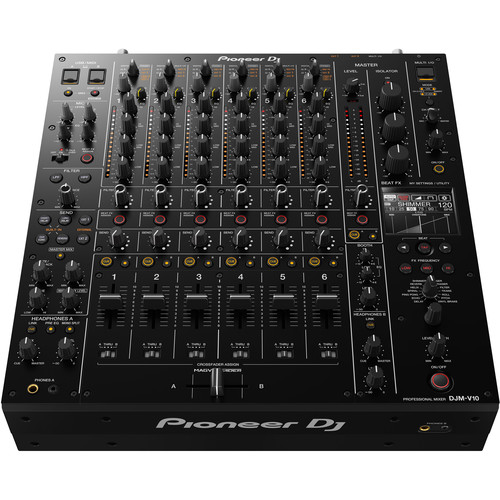
Forge a new sound with the DJM-V10; a new breed of mixer, born of fresh thinking. It’s built to allow the most creative DJs to craft original soundscapes
Forge a new sound with the DJM-V10; a new breed of mixer, born of fresh thinking. It’s built to allow the most creative DJs to craft original soundscapes.
This 6-channel unit – loaded with unique features – produces warm audio full of energy and presence. So, take full control of your mix and get ready to create something the crowd has never heard before – either performing solo or back-to-back with another DJ.
6 channels with a wide range of inputs
You’re free to create your perfect setup with 6 channels and a host of different input types.
4-BAND EQ and compressor
Take full control of your mix with the newly developed 4-band EQ. A built-in compressor enables further adjustment of the loudness of your tracks
Effects for more creative expression
The expanded send/return section enables you to add external FX, or even combine them with built-in FX. Create unique sounds; the possibilities are nearly limitless
Reviews
There are no reviews yet.
Be the first to review “Pioneer DJ DJM-V10” Cancel reply
Forge a new sound with the DJM-V10; a new breed of mixer, born of fresh thinking. It’s built to allow the most creative DJs to craft original soundscapes
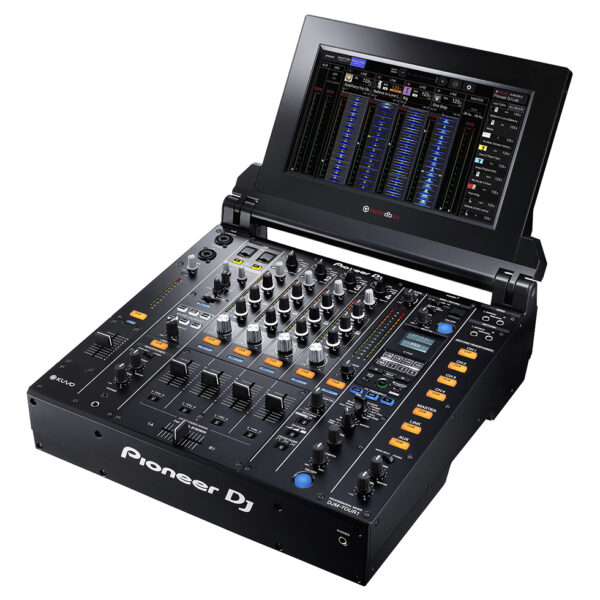
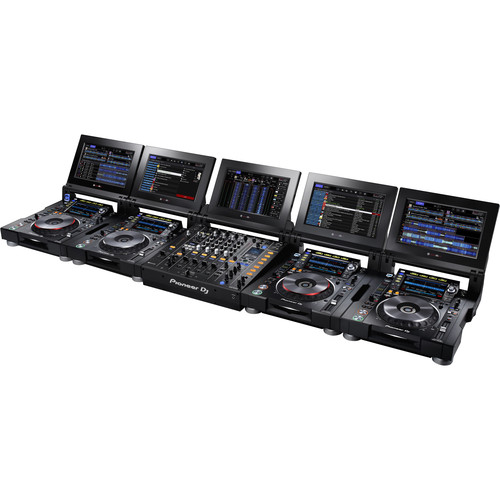
Pioneer DJM Series pro mixers are the industry standard centerpieces for pro-level DJ performances, and now they’ve upped the ante with the PIONEER DJ DJM TOUR1. Tour from festival to arena with the PIONEER DJ DJM TOUR1 and perform at the highest level. Connect up to 4 CDJ-TOUR1's via Pro DJ Link and enjoy a sturdy, reliable set-up every single performance.
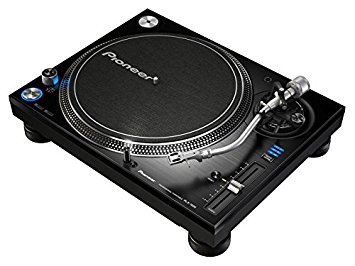
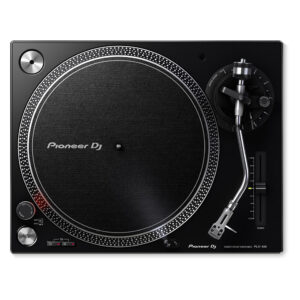
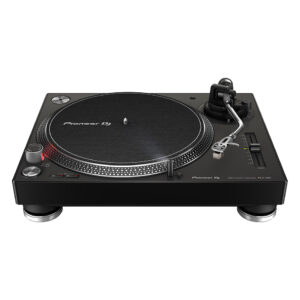
The PLX-1000 is precision engineered for the booth, drawing on 50 years’ experience of making high-end turntables. The result is a familiar layout with some next generation improvements, including a high-torque direct drive system, multi-pitch control, club-grade build and sound quality, and detachable power and audio cables. It’s solidly built for excellent vibration damping and ultra-precise, high-grade audio playback.
Simply add your choice of cartridge and stylus to the PLX-1000 (not included) and combine with your mixer for an ideal setup for turntablists. An ideal match for DJs is the handmade PC-X10 (sold separately).
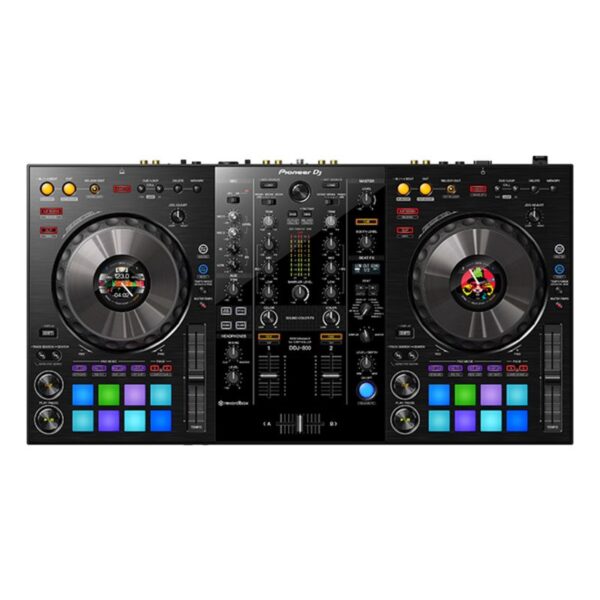
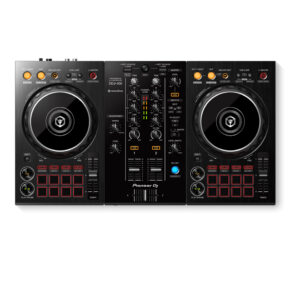
The DDJ-800 2-channel DJ controller is a pro DJ setup that’s made to go wherever you do. This portable unit inherits the club-style layout and popular features of the DDJ-1000, including Color On Jog Displays, and packs it all into a lighter body. The result is a professional performance controller that you’ll have no trouble transporting between gigs at weddings, parties and anywhere else you play.
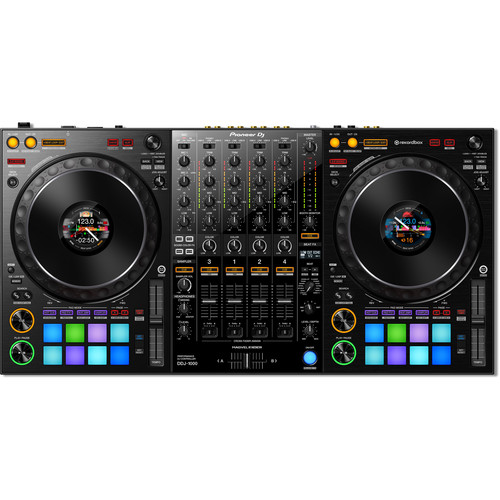
Make the most of rekordbox dj’s enhanced new features with our dedicated 4-channel DJ controller. Featuring the professional layout inherited from the flagship NXS2 models, it’s the portable, compact solution for performing at parties and events. The DDJ-1000 features all-new high definition LCD screens on each jog wheel, allowing you to keep your eyes intuitively on the deck.Fluidly select tracks you didn’t consider compatible thanks to rekordbox dj’s new Related Tracks feature. Bring creative flair to performances with 14 Beat FX – including four new versions – and instantly trigger Hot Cues, Loops and more with the 16 multicoloured Performance Pads.
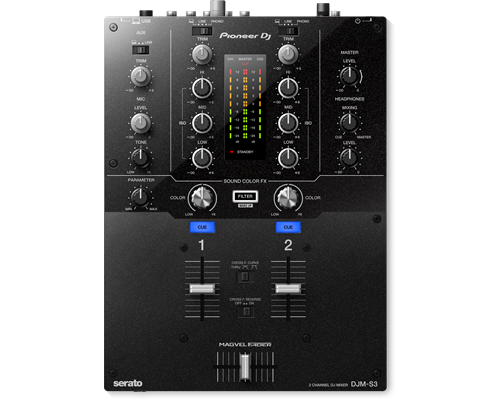
Thanks to the built-in soundcard, this 2-channel mixer is Serato DJ enabled as soon as you unpack it. Featuring a highly durable Magvel crossfader, inherited from the DJM-900NXS2, the DJM-S3 delivers a smooth and accurate response.
Content
Craft your sound
Forge a new sound with the DJM-V10; a new breed of mixer, born of fresh thinking. It’s built to allow the most creative DJs to craft original soundscapes.
This 6-channel unit – loaded with unique features – produces warm audio full of energy and presence. So, take full control of your mix and get ready to create something the crowd has never heard before – either performing solo or back-to-back with another DJ.
6 channels with a wide range of inputs
You’re free to create your perfect setup with 6 channels and a host of different input types.
4-BAND EQ and compressor
Take full control of your mix with the newly developed 4-band EQ. A built-in compressor enables further adjustment of the loudness of your tracks
Effects for more creative expression
The expanded send/return section enables you to add external FX, or even combine them with built-in FX. Create unique sounds; the possibilities are nearly limitless
Pioneer DJM Series pro mixers are the industry standard centerpieces for pro-level DJ performances, and now they’ve upped the ante with the PIONEER DJ DJM-TOUR1. Tour from festival to arena with the PIONEER DJ DJM TOUR1 and perform at the highest level. Connect up to 4 CDJ-TOUR1's via Pro DJ Link and enjoy a sturdy, reliable set-up every single performance.
https://youtu.be/82xt1r3IpP0
Warm Sound at Any Venue
A 32-bit D/A convertor, made by ESS Technologies, delivers incredibly low noise and distortion even at super-high volumes. Additionally the 96 kHz/24-bit soundcard, 64-bit floating point mixing processing, enhanced dithering technology and a low-jitter clock combine to provide an accurate, natural analogue sound.
Connect to Front of House
The AES/EBU digital output lets you connect directly to the PA, regardless of its positioning. Together with the word clock input it ensures high-grade digital audio signal transmission to front of house for precise synchronization and the best possible sound quality.
13-Inch Foldout Touchscreen
Use multicolored touch display to browse and select tracks from up to 4 CDJs connected via Pro DJ Link. Choose between a horizontal multi-wave view or a vertical view that also includes an RMS meter so you can monitor and control the volume for each channel.
5-Port LAN Hub
A 5-port LAN hub means you can connect up to 5 players or laptops to the DJM-TOUR1. Via Pro DJ Link you can share one source across up to 4 players – and if you're using rekordbox dj you get access to a host of advanced performance features on top.
Easy B2B Cueing
2 independent headphone sections let you and another DJ cue tracks at the same time without hearing each other's input. Each headphone also has its own volume control for ease and comfort.
Festival-proof design
The DJM-TOUR1's rigid design comes with isolator feet for stability on any surface and reinforced sides. What's more, the LAN ports have NEUTRIK etherCON® connectors with a latch lock, so compatible cables will stay in place whatever vibrations and knocks are thrown at them.
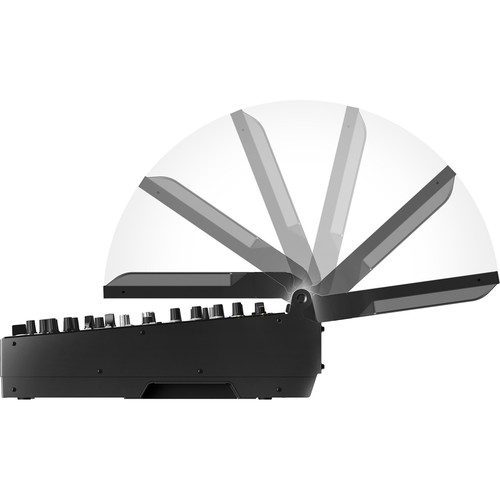
Screen adjustments
Tilt the screen to suit your preference, adjust the lighting or attach the display shad to protect the sun's glare when you're playing outside.
Built-in KUVO Gateway
The DJM-TOUR1 is Pioneer’s first mixer to have a KUVO Gateway on board so you can easily connect to KUVO and broadcast your set information, in real time, to fans around the world.
FEATURES
General
Channels: 4
MIDI Control: Full assignable MIDI controls
DVS Control: rekordbox dvs (not included)
ProDJ Link: Yes
P-LOCK Fader Caps: Yes
Auto Standby: Yes
Crossfader Type: Magvel Fader
CURVE Assignable: Yes
Fader Curve: 3
Performance
Frequency Range: 20Hz - 40kHz
Sampling Rate: 96 kHz
A/D Converter: 24-bit
D/A Converter: 32-bit
Inputs
4 Digital (Coaxial)
4 CD/LINE (RCA)
4 PHONO (RCA)
1 AUX (XLR, 1/4 inch TRS Jack)
2 MIC (XLR/TRS Jack Combo, 1/4 inch TRS Jack)
1 Word Clock (BNC)
Outputs
2 MASTER (XLR, RCA)
1 BOOTH (XLR)
4 HEADPHONE MONITOR (each section: 1/4 inch Jack, mini-jack)
1 REC (RCA)
1 Digital (Coaxial)
Other
Width: 15.16 in
Height: 7.01 in
Depth: 17.76 in
Weight: 24.69 lb
Title
Value
Included Accessories
Audio cable
Turntable sheet
Slip mat and sheet
Dust cover
Head shell
Balance
sub and shell weights
Ground wire
Weight
14.6 kg
Drive Method
Quartz lock, servo-type, direct drive
Platter
Aluminium, die-casting diameter: 332 mm
Motor
3-phase, brushless DC motor
Braking System
Electronic brake
Rotation Adjustment Range
±8, ±16, ±50 %
Rotation Speed
33⅓-45 rpm
Wow and Flutter
< 0.01 % (Measured by obtaining signal from built-in frequency generator of motor assembly.)
Signal-to-Noise Ratio
70 dB
Starting Torque
> 4.5 kgf・cm
Start Time
Within 0.3 sec (at 33⅓ rpm)
Arm Type
Universal type S-shape tone arm Gimbal-supported type bearing structure Static balance type
Overhang
15 mm
Effective Length
230 mm
Tracking Error
Within 3°
Height Adjustment Range
6 mm
Proper Cartridge Weight
3.5-13 g
Stylus Pressure Variable Range
0-4 g (1 scale 0.1 g)
Brand
Pioneer
Height
159 mm
width
453 mm
USB
No
inputs
No
outputs
1 ANALOGUE (RCA)
Depth
353 mm
TAKE YOUR PERFORMANCE ANYWHERE
The DDJ-800 2-channel DJ controller is a pro DJ setup that’s made to go wherever you do. This portable unit inherits the club-style layout and popular features of the DDJ-1000, including Color On Jog Displays, and packs it all into a lighter body. The result is a professional performance controller that you’ll have no trouble transporting between gigs at weddings, parties and anywhere else you play.
Stop worrying about MCs walking in front of the speaker thanks to the compatible Feedback Reducer feature in rekordbox dj. The system will automatically bring down the ‘howling’ sound from the mic – extra handy when you have 2 microphones plugged in at once. Use the DDJ-800 to mix audio from external sources, and apply Sound Color FX, Beat FX, EQs and Trim to make all of your shows unique.
KEY FEATURES
COMPACT AND PORTABLE
Though it feels like our advanced DDJ-1000 DJ controller, the DDJ-800 is 1.3 kg lighter so you can comfortably transport it between events.
JOG DISPLAY
Keep your eyes on the deck and off your computer thanks to the customizable Color LCD On Jog Display located in the centre of each jog wheel. Reveal only the information you need, whether that’s BPM, waveform, playback position or Hot Cue and Loop points.
FEEDBACK REDUCER
Enjoy peace of mind when you hand the mic to guest speakers and MCs. The Feedback Reducer feature in rekordbox dj will instantly detect and reduce the ‘howling’ sound of microphone feedback so you’ll remain in complete control of the audio.
CLUB-STYLE LAYOUT
Performing on the DDJ-800 feels like you’re using a professional NXS2 set-up. The controller’s buttons, knobs and faders are arranged in the same way as those on our club-standard CDJ and DJM gear.
AUDIO MIXER FEATURE
Use the DDJ-800 as a mixer to control the volume of audio from an external device – even when you’re using it on its own – by adjusting the trims, channel faders and EQs. And, when connected to rekordbox dj, you can use Sound Color FX and Beat FX too.
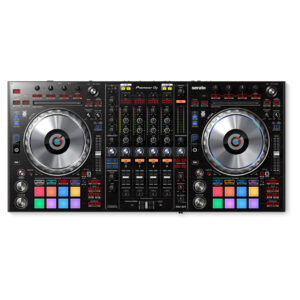
The Pioneer DJ DDJ-1000 controller is designed from the ground up to give you comprehensive control over rekordbox DJ software. It has everything you need to perform at events and parties, including two full-size jog wheels with On Jog Display, 14 Beat FX, and 16 multicolored performance pads. Using rekordbox DJ software's Related Tracks feature, you'll quickly be able to find tracks that flow well with the tune you're currently playing. Compact and portable, the Pioneer DJ DDJ-1000 controller combined with rekordbox DJ software is a sweet setup for mobile DJs.
Based on Pioneer's NXS2 systems
If you've ever gotten your hands on Pioneer DJ's CDJ-2000NXS2 or DJM-900NXS2 systems, you'll feel right at home with the DDJ-1000 controller. Its buttons and knobs are based on the same layout as the NXS2 systems — using the DDJ-1000 is the same as using an NXS2 setup to control music from an external USB drive.
Updated Magvel crossfader
DJs at Sweetwater love the feel of the Magvel crossfader, based on the Magvel Fader Pro from the DJM-S9 pro battle mixer. Pioneer DJ has updated the Magvel fader for the DDJ-1000, to offer even more durability and nuanced control. Also, the software processing for jog wheel and crossfader operation has been refined for greatly reduced latency, creating a faster and more intuitive feel than ever.
Multiple inputs/outputs for seamless DJ changeovers
DJs using rekordbox DJ software can hand off to each other faster and smoother with the DDJ-1000 controller. Two USB ports allow two DJs to connect their laptops simultaneously. Four analog inputs accommodate turntables, and there are two mic inputs as well. The DDJ-1000 can even operate as a standalone DJ mixer without connecting a laptop at all.
Pioneer DJ DDJ-1000 Controller Features:
DJ controller designed for comprehensive control over rekordbox DJ software (Mac/PC)
Based on Pioneer's NXS2 systems for a familiar layout and control scheme
LCD jog display shows you playback time, BPM, waveform, playback position and Hot Cue and Loop points
14 Beat FX for adding depth and excitement to your mixes
Improved Magvel fader for even more durability and lower latency
Two USB ports for seamless DJ handoffs
16 multicolor performance pads for triggering Hot Cues, Pad FX, Beat Jump, and much more
Lightweight and portable for mobile DJs
Brand
Pioneer
MIDIControl
N/A
DVS Control
Serato DVS
Included DJ Software
No
Included Accessories
Power cord
Operating instructions
AC adaptor
USB cable
Software System Requirements
Windows® 10, 8.1, 7 (latest service pack) mac OS Sierra, X 10.11, 10.10 (latest update) Processor: Intel® processor Core™ i7、 i5、i3 1.07 GHz Memory: 32-bit, 64-bit: 4 GB or more of RAM USB: Available USB 2.0 port Free HDD Space: 5GB Display resolution: 1280 x 720


 5-Port LAN Hub
A 5-port LAN hub means you can connect up to 5 players or laptops to the DJM-TOUR1. Via Pro DJ Link you can share one source across up to 4 players – and if you're using rekordbox dj you get access to a host of advanced performance features on top.
Easy B2B Cueing
2 independent headphone sections let you and another DJ cue tracks at the same time without hearing each other's input. Each headphone also has its own volume control for ease and comfort.
Festival-proof design
The DJM-TOUR1's rigid design comes with isolator feet for stability on any surface and reinforced sides. What's more, the LAN ports have NEUTRIK etherCON® connectors with a latch lock, so compatible cables will stay in place whatever vibrations and knocks are thrown at them.
Screen adjustments
Tilt the screen to suit your preference, adjust the lighting or attach the display shad to protect the sun's glare when you're playing outside.
Built-in KUVO Gateway
The DJM-TOUR1 is Pioneer’s first mixer to have a KUVO Gateway on board so you can easily connect to KUVO and broadcast your set information, in real time, to fans around the world.
5-Port LAN Hub
A 5-port LAN hub means you can connect up to 5 players or laptops to the DJM-TOUR1. Via Pro DJ Link you can share one source across up to 4 players – and if you're using rekordbox dj you get access to a host of advanced performance features on top.
Easy B2B Cueing
2 independent headphone sections let you and another DJ cue tracks at the same time without hearing each other's input. Each headphone also has its own volume control for ease and comfort.
Festival-proof design
The DJM-TOUR1's rigid design comes with isolator feet for stability on any surface and reinforced sides. What's more, the LAN ports have NEUTRIK etherCON® connectors with a latch lock, so compatible cables will stay in place whatever vibrations and knocks are thrown at them.
Screen adjustments
Tilt the screen to suit your preference, adjust the lighting or attach the display shad to protect the sun's glare when you're playing outside.
Built-in KUVO Gateway
The DJM-TOUR1 is Pioneer’s first mixer to have a KUVO Gateway on board so you can easily connect to KUVO and broadcast your set information, in real time, to fans around the world.


Reviews
There are no reviews yet.