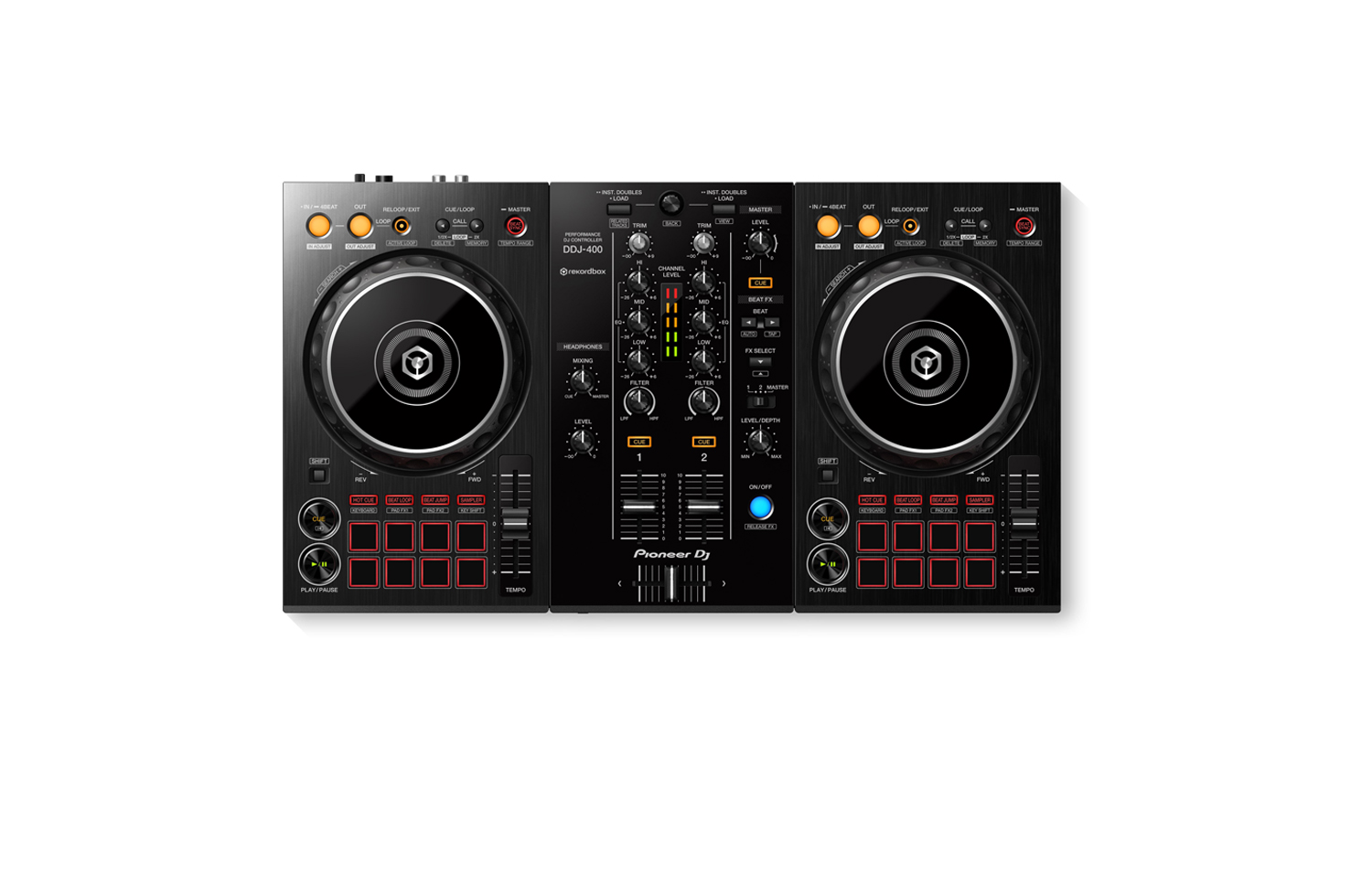
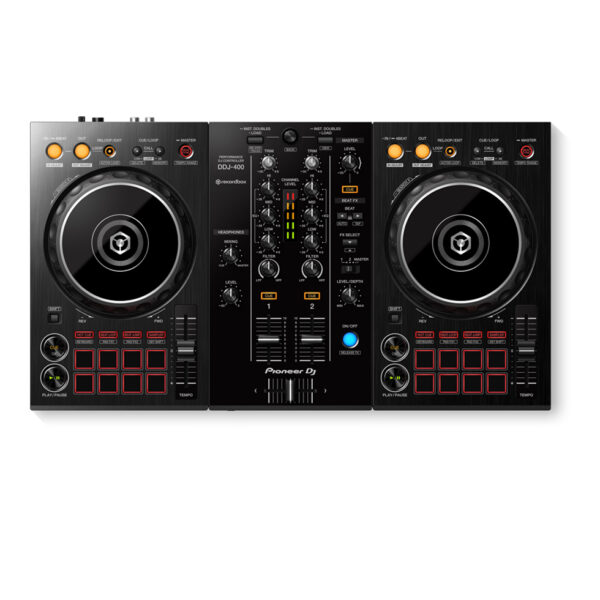
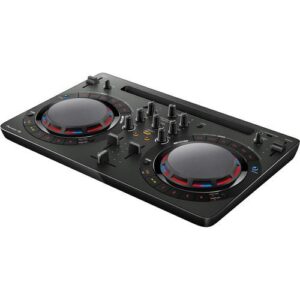
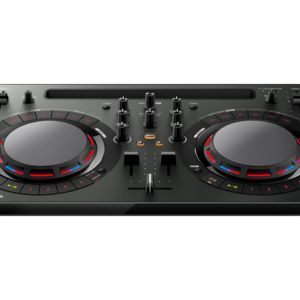
With the Pioneer DDJ-400, you’ll learn the intricacies of the profession as a starting DJ. Thanks to the internal sound card, you don’t need to connect an audio interface. This means that you can connect the DJ controller directly to your speakers. Thanks to the velocity-sensitive and multifunctional drum pads, you can get the most out of the included Rekordbox software. Use the drum pads to activate the sampler, and personalize your set by adding sound clips. You can also use the drum pads to easily jump to a hot cue.
You’ll have access to rekordbox dj’s Tutorial feature. Follow along via your computer screen to learn how to use the gear and master DJ techniques on Pioneer DDJ 400.
CLUB-STYLE LAYOUT
The DDJ-400’s buttons and knobs are arranged in the same way as those on our professional NXS2 set-up. Develop your skills using an interface similar to that of our club-standard player, and enhance your mixes with Sound Color FX and Beat FX featuring curves taken from our DJM-900NXS2 mixer. You’ll soon feel comfortable performing in DJ booths.
BEAT FX
Apply professional FX that match the tempo of the track that’s currently playing by using the Beat FX feature. This will help you craft unique sets even if you’re just starting out.
REKORDBOX DJ
You get a rekordbox dj licence key bundled with this controller. Simply activate your licence key for our DJ software, connect the controller and start DJing.
PC MASTER OUT
For flexibility you can choose to hear your mix through your computer’s internal speakers or connected desktop speakers. At the same time, you can use your headphones to cue independently of the master out.
PLUG AND PLAY
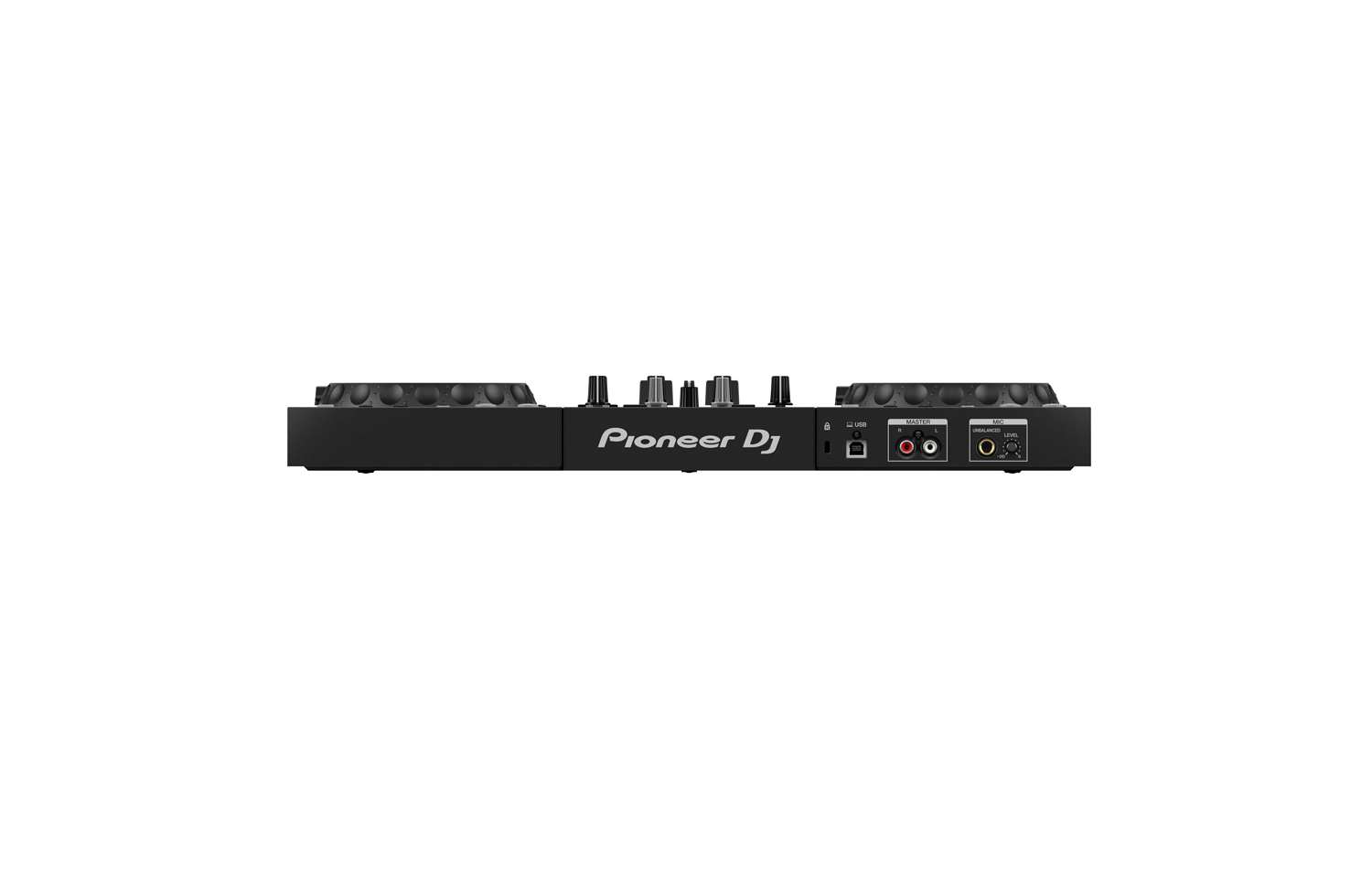
With a built-in sound card, simply connect the controller to your computer using the provided USB cable to power up and begin playing.
Offer Note: Free Hercules Club LED Wristband
Reviews
There are no reviews yet.
Be the first to review “Pioneer DJ DDJ-400 2-channel DJ controller for rekordbox dj” Cancel reply
With the Pioneer DDJ-400, you'll learn the intricacies of the profession as a starting DJ. Thanks to the internal sound card, you don't need to connect an audio interface. This means that you can connect the DJ controller directly to your speakers. Thanks to the velocity-sensitive and multifunctional drum pads, you can get the most out of the included Rekordbox software. Use the drum pads to activate the sampler, and personalize your set by adding sound clips. You can also use the drum pads to easily jump to a hot cue.
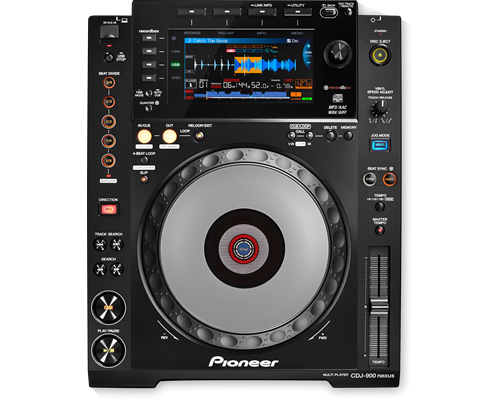
The CDJ-900NXS builds on the success of its predecessor, the CDJ-900, plus it’s packed with new technology including a full colour LCD screen, Beat Divide, four-deck Beat Sync and the ability to play sets from a smartphone.
The CDJ-900NXS boasts a high resolution screen, giving DJs a quick and instant view of the Wave Display and Wave Zoom and the ability to view and edit rekordbox beatgrids.
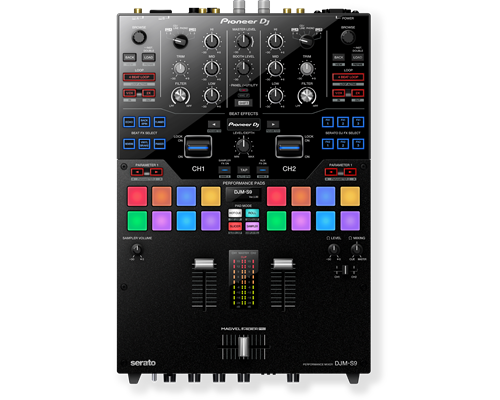
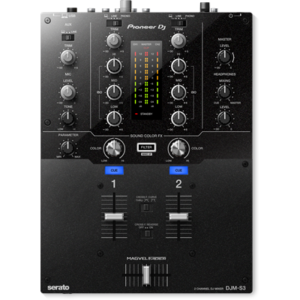
Meet the DJM-S9, our first two-channel battle mixer for Serato DJ. With a fully configurable Magvel Pro crossfader and customisable FX buttons and pads, you can tailor the mixer to suit your DJing style. The tough DJM-S9 is build to withstand the most energetic scratch performances, and it boasts high-quality audio circuitry inherited from our flagship 4-channel digital mixer, the DJM-2000NXS.
Generate Light Shows for Your DJ Set Automatically
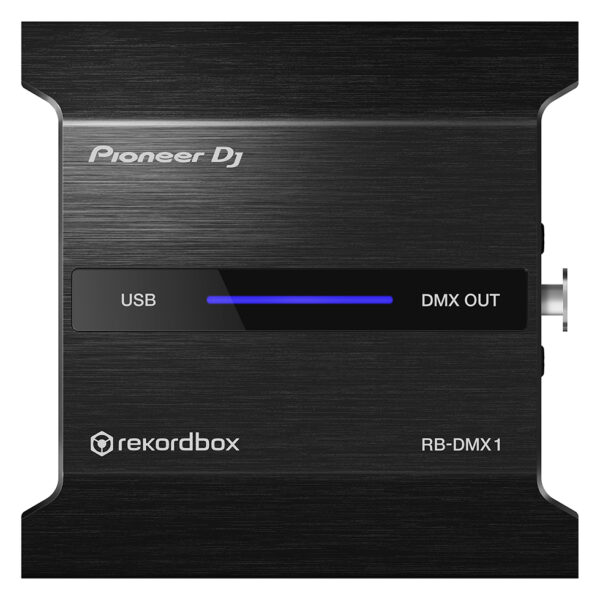
With the PIONEER DJ RB DMX1 converter and lighting controller, you'll be able to use rekordbox DJ's Lighting mode to automatically create light shows that sync with your music. Introduced in rekordbox DJ v5.2, Lighting mode makes setting up your lightshow an effortless automatic process, with the ability to quickly customize it to your preferences. Connect the PIONEER DJ RB DMX1 converter to your Mac or PC, add a set of DMX512-supported lighting fixtures, and Lighting mode will control your lights in sync with your music. In other words, you can eliminate hours of pre-show lighting setup with the PIONEER DJ RB DMX1 converter. Call your megs star technology Sales Engineer to learn more about how to add this to your DJ setup.
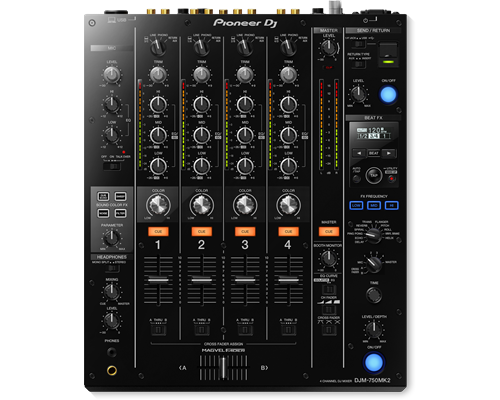
Take the step to the DJ booth seamlessly with the DJM-750MK2, a 4-channel mixer which inherits key features and design elements from the DJM-900NXS2, creating a club-style setup when combined with our professional CDJ or XDJ multi players.
You can perform seamless mixes on the DJM-750MK2 thanks to the smooth curves on the EQs and channel faders. The Magvel crossfader, inherited from the DJM-900NXS2, gives a precise response and assured feel during even the most complicated scratch techniques.
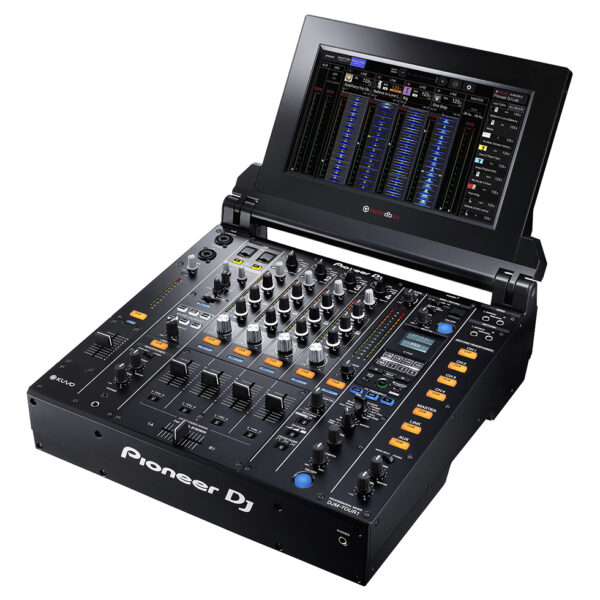
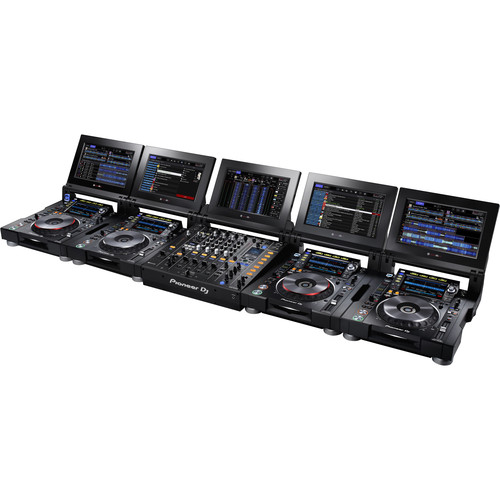
Pioneer DJM Series pro mixers are the industry standard centerpieces for pro-level DJ performances, and now they’ve upped the ante with the PIONEER DJ DJM TOUR1. Tour from festival to arena with the PIONEER DJ DJM TOUR1 and perform at the highest level. Connect up to 4 CDJ-TOUR1's via Pro DJ Link and enjoy a sturdy, reliable set-up every single performance.
Content
Pioneer DDJ 400
KEY FEATURES Of Pioneer DDJ 400
TUTORIALS of Pioneer DDJ 400
You'll have access to rekordbox dj's Tutorial feature. Follow along via your computer screen to learn how to use the gear and master DJ techniques on Pioneer DDJ 400.
CLUB-STYLE LAYOUT
The DDJ-400's buttons and knobs are arranged in the same way as those on our professional NXS2 set-up. Develop your skills using an interface similar to that of our club-standard player, and enhance your mixes with Sound Color FX and Beat FX featuring curves taken from our DJM-900NXS2 mixer. You'll soon feel comfortable performing in DJ booths.
BEAT FX
Apply professional FX that match the tempo of the track that’s currently playing by using the Beat FX feature. This will help you craft unique sets even if you’re just starting out.
REKORDBOX DJ
You get a rekordbox dj licence key bundled with this controller. Simply activate your licence key for our DJ software, connect the controller and start DJing.
PC MASTER OUT
For flexibility you can choose to hear your mix through your computer’s internal speakers or connected desktop speakers. At the same time, you can use your headphones to cue independently of the master out.
PLUG AND PLAY
With a built-in sound card, simply connect the controller to your computer using the provided USB cable to power up and begin playing.
Offer Note: Free Hercules Club LED Wristband
Brand
Pioneer
USB Storage Support
No
MIDI Control
ProDJ Link
KUVO ready
Auto Standby
rekordbox
Included Accessories
Power cord
CD-ROM (rekordbox
driver software and operating instructions)
Audio cable
LAN cable
Disc forced Eject Pin
Read Before Use / Quick Start Guide
Height
105.5 mm
width
320 mm
Depth
401.8 mm
Dimensions (with fold-out display)
When upper display part is upright at 90 degrees (W x D x H): 385 x 457.2 x 418 mm
Processor
Wolfson DAC processor
Soundcard
24 bit/48 kHz
Frequency Range
4 - 20000 Hz
Signal-to-Noise Ratio
115 dB (JEITA)
Audio Output Level
2.0 Vrms (1 kHz, 0 dB)
Power Consumption
33 W
Display
Full-colour LCD screen
Playing Address
Wave Zoom Display
Beat Counter
Distortion
< 0.003 % (JEITA)
Jog Dial size
206 mm
Jog Dial type
Touch sensitive
Jog Modes
CDJ / Vinyl Mode
Active Loop
Auto Beat Loop
4 Beat Loop
Reloop
Real Time Seamless Loop
Loop Adjust
In / Out Adjust
Loop Cutter
Slip Mode
Beat Sync
Reverse
Pitch Bend
Fader Start / Back Cue start
Scratch Play / Cue
Quick Scratch
After searching track
Relay Play
Frame Search
1/150 s
My Settings
Vinyl Speed Adjust
Auto Cue
Manual Cue
Real Time Cue
Cue point sampler
Cue Loop Memory
Master Tempo
Tempo Control steps
0.02 % at +/-6 %
0.05 % at +/- 10 % & 16 %
0.5 % at +/-100 % WIDE
Needle Search / Needle Drop
BPM Counter
Audio Sources
iPhone/iPad/iPod touch
Android phones/Android Tablets
USB storage devices (flash memory/HDD
etc.)
Computers (Mac/Windows PC)
Optical drive (CD
CD-R/RW
DVD±R/RW/R-DL)
LAN
1 (100Base-TX)
USB
No
outputs
1 ANALOGUE (RCA)
1 CONTROL (Mini-jack)
1 S/PDIF Digital (RCA)
Brand
Pioneer
MIDIControl
Full assignable MIDI controls
DVS Control
Serato DVS
Included DJ Software
N/A
Included Accessories
No
Software System Requirements
Windows 8.1/7 (CPU) Core i3, i5 or i7 1.07 GHz, (Memory) 4GB Mac OS X 10.10/10.9/10.8 (CPU) Core i3, i5 or i7 1.07 GHz, (Memory) 4GB Display Resolution 1280 x 720 or higher
ProDJ Link
P-LOCK Fader Cap
rekordbox Link
Plug and Play
Auto Standby
Height
107.9 mm
width
267 mm
Depth
407.3 mm
Weight
4.6 kg
Dimensions (with fold-out display)
No
Rack Mount
Frequency Range
20 - 20000 Hz
Sampling Rate
N/A
A/D, D/A Converter
N/A
D/A Converter
N/A
A/D Converter
N/A
S/N Ratio Phono
N/A
S/N Ratio Line
N/A
S/N Ratio Mic
N/A
S/N Ratio USB
107 dB
Crosstalk Line
N/A
Distortion
< 0.005 % (USB)
Headroom
N/A
Power Consumption
N/A
Power Supply
N/A
Master Balance
Stereo/Mono Switch
Master Out Attenuator
EQ/ISO
3 band
EQ/ISO Range
-∞ ~ +6 dB
Level Meter Type
Individual
Level Meter Size
9 segment
Reverse Channels
Peak Limiter
Channels
2
Sound Color FX
Dub Echo
Filter
Noise
Wide Filter
Pitch
Beat FX
Delay
Echo
Phaser
Spiral
Reverb
Roll
Trans
Vinyl Brake
Flanger
Back Spin
Fader Synth Saw
Fader Synth Sine
Fader Synth Square
HP Filter
LP Filter
Serato DJ FX powered by iZotope
3-Band Isolator
Auto BPM Counter
Beat Sampler
Direct Beat Select
Effect Level & Depth Volume
Effect Mix
Inloop Sampler
Live Sampler
MIDI Global Clock
Roll Sampler (Fwd)
Roll Sampler (Reverse)
Sidechain Remix Effects
Sound Processor
No
Touch Panel
FX Frequency
X-PAD
rekordbox Quantize
Performance Modes
No
Crossfader Type
Magvel Fader Pro
CURVE Assignable
Field Replaceable
Reverse Crossfader
Tension Adjustment
Fader Curve
No
Mic Connection
XLR / 1/4-inch Jack Combo
Mic EQ
No
Mic EQ Range
No
Talkover
ON/OFF Button
Talkover Attenuator
Assignable Controls
No
MIDI Out (DIN)
No
MIDI On/Off
MIDI Start/Stop
MIDI Clock
Connection
USB
Stereo Inputs
No
Stereo Outputs
No
Sample Rate
24 bit
inputs
2 PHONO (RCA)
1 AUX (RCA)
1 MIC (XLR/Jack Combo)
2 CD/LINE (RCA)
Send/Return
No
LAN
No
USB
2 USB B ports
outputs
2 MASTER (XLR
RCA)
2 HEADPHONE MONITOR (1/4 inch Jack
mini-jack)
1 BOOTH (1/4 inch Jack)
PIONEER DJ RB DMX1
With the PIONEER DJ RB DMX1 converter and lighting controller, you'll be able to use rekordbox DJ's Lighting mode to automatically create light shows that sync with your music. Introduced in rekordbox DJ v5.2, Lighting mode makes setting up your lightshow an effortless automatic process, with the ability to quickly customize it to your preferences. Connect the PIONEER DJ RB DMX1 converter to your Mac or PC, add a set of DMX512-supported lighting fixtures, and Lighting mode will control your lights in sync with your music. In other words, you can eliminate hours of pre-show lighting setup with the PIONEER DJ RB DMX1 converter. Call your megs star technology Sales Engineer to learn more about how to add this to your DJ setup.
https://youtu.be/2jJ-F2kbmHg
Pioneer DJ RB-DMX1 DMX Converter/Lighting Controller Features:
DMX converter for use with rekordbox DJ software (license included)
Converts rekordbox DJ's Lighting mode data to DMX to control DMX512-supported lighting fixtures
Supports 1 universe (512 channels) of DMX control
Aluminum casing for durability
Connects to your Mac or PC via USB (cable included)
Pioneer DJM Series pro mixers are the industry standard centerpieces for pro-level DJ performances, and now they’ve upped the ante with the PIONEER DJ DJM-TOUR1. Tour from festival to arena with the PIONEER DJ DJM TOUR1 and perform at the highest level. Connect up to 4 CDJ-TOUR1's via Pro DJ Link and enjoy a sturdy, reliable set-up every single performance.
https://youtu.be/82xt1r3IpP0
Warm Sound at Any Venue
A 32-bit D/A convertor, made by ESS Technologies, delivers incredibly low noise and distortion even at super-high volumes. Additionally the 96 kHz/24-bit soundcard, 64-bit floating point mixing processing, enhanced dithering technology and a low-jitter clock combine to provide an accurate, natural analogue sound.
Connect to Front of House
The AES/EBU digital output lets you connect directly to the PA, regardless of its positioning. Together with the word clock input it ensures high-grade digital audio signal transmission to front of house for precise synchronization and the best possible sound quality.
13-Inch Foldout Touchscreen
Use multicolored touch display to browse and select tracks from up to 4 CDJs connected via Pro DJ Link. Choose between a horizontal multi-wave view or a vertical view that also includes an RMS meter so you can monitor and control the volume for each channel.
5-Port LAN Hub
A 5-port LAN hub means you can connect up to 5 players or laptops to the DJM-TOUR1. Via Pro DJ Link you can share one source across up to 4 players – and if you're using rekordbox dj you get access to a host of advanced performance features on top.
Easy B2B Cueing
2 independent headphone sections let you and another DJ cue tracks at the same time without hearing each other's input. Each headphone also has its own volume control for ease and comfort.
Festival-proof design
The DJM-TOUR1's rigid design comes with isolator feet for stability on any surface and reinforced sides. What's more, the LAN ports have NEUTRIK etherCON® connectors with a latch lock, so compatible cables will stay in place whatever vibrations and knocks are thrown at them.
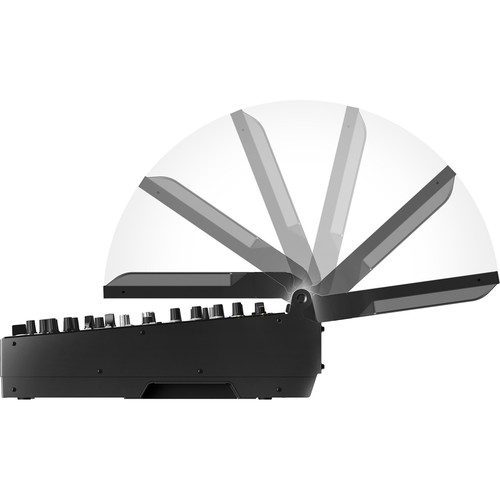
Screen adjustments
Tilt the screen to suit your preference, adjust the lighting or attach the display shad to protect the sun's glare when you're playing outside.
Built-in KUVO Gateway
The DJM-TOUR1 is Pioneer’s first mixer to have a KUVO Gateway on board so you can easily connect to KUVO and broadcast your set information, in real time, to fans around the world.
FEATURES
General
Channels: 4
MIDI Control: Full assignable MIDI controls
DVS Control: rekordbox dvs (not included)
ProDJ Link: Yes
P-LOCK Fader Caps: Yes
Auto Standby: Yes
Crossfader Type: Magvel Fader
CURVE Assignable: Yes
Fader Curve: 3
Performance
Frequency Range: 20Hz - 40kHz
Sampling Rate: 96 kHz
A/D Converter: 24-bit
D/A Converter: 32-bit
Inputs
4 Digital (Coaxial)
4 CD/LINE (RCA)
4 PHONO (RCA)
1 AUX (XLR, 1/4 inch TRS Jack)
2 MIC (XLR/TRS Jack Combo, 1/4 inch TRS Jack)
1 Word Clock (BNC)
Outputs
2 MASTER (XLR, RCA)
1 BOOTH (XLR)
4 HEADPHONE MONITOR (each section: 1/4 inch Jack, mini-jack)


 5-Port LAN Hub
A 5-port LAN hub means you can connect up to 5 players or laptops to the DJM-TOUR1. Via Pro DJ Link you can share one source across up to 4 players – and if you're using rekordbox dj you get access to a host of advanced performance features on top.
Easy B2B Cueing
2 independent headphone sections let you and another DJ cue tracks at the same time without hearing each other's input. Each headphone also has its own volume control for ease and comfort.
Festival-proof design
The DJM-TOUR1's rigid design comes with isolator feet for stability on any surface and reinforced sides. What's more, the LAN ports have NEUTRIK etherCON® connectors with a latch lock, so compatible cables will stay in place whatever vibrations and knocks are thrown at them.
Screen adjustments
Tilt the screen to suit your preference, adjust the lighting or attach the display shad to protect the sun's glare when you're playing outside.
Built-in KUVO Gateway
The DJM-TOUR1 is Pioneer’s first mixer to have a KUVO Gateway on board so you can easily connect to KUVO and broadcast your set information, in real time, to fans around the world.
5-Port LAN Hub
A 5-port LAN hub means you can connect up to 5 players or laptops to the DJM-TOUR1. Via Pro DJ Link you can share one source across up to 4 players – and if you're using rekordbox dj you get access to a host of advanced performance features on top.
Easy B2B Cueing
2 independent headphone sections let you and another DJ cue tracks at the same time without hearing each other's input. Each headphone also has its own volume control for ease and comfort.
Festival-proof design
The DJM-TOUR1's rigid design comes with isolator feet for stability on any surface and reinforced sides. What's more, the LAN ports have NEUTRIK etherCON® connectors with a latch lock, so compatible cables will stay in place whatever vibrations and knocks are thrown at them.
Screen adjustments
Tilt the screen to suit your preference, adjust the lighting or attach the display shad to protect the sun's glare when you're playing outside.
Built-in KUVO Gateway
The DJM-TOUR1 is Pioneer’s first mixer to have a KUVO Gateway on board so you can easily connect to KUVO and broadcast your set information, in real time, to fans around the world.

Reviews
There are no reviews yet.