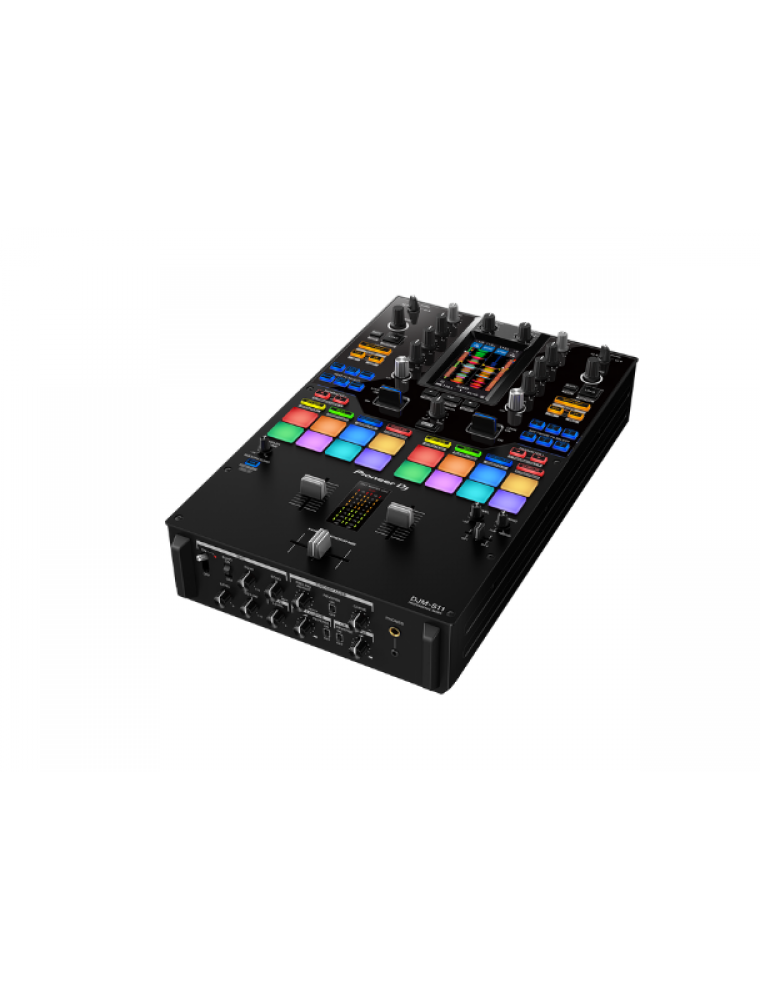
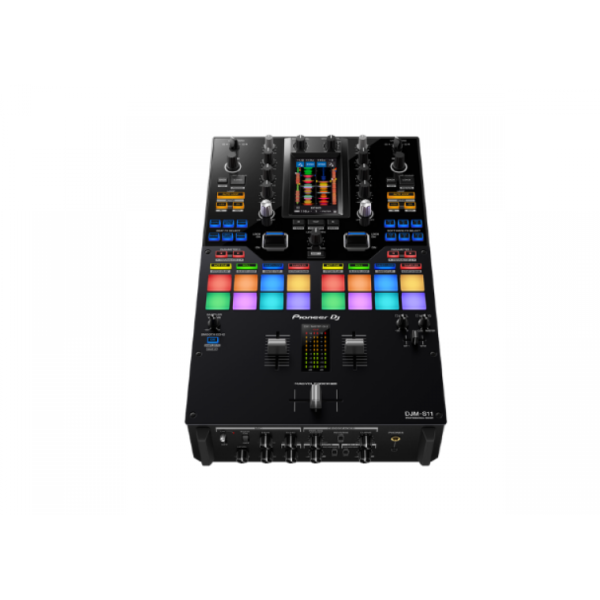
Raise your game with the DJM-S11. This new professional 2-channel, 4-deck control battle mixer enhances various elements from its predecessor, the DJM-S9, and offers a host of brand-new features to help you perform more freely with Serato DJ Pro or rekordbox.
KEY FEATURES
Customizable touch screen
A 4.3-inch customizable touch screen gives all the information you need. Browse tracks, check waveforms, and dynamically change the texture of the music with TOUCH FX. With Touch MIDI you can directly control functions in your DJ software without touching your laptop.
Waveform screen
Spend more time focusing on your mix thanks to the high-frame-rate color touch screen, which shows everything from waveforms to BPM so you can stay in the zone. You can even customize it with your preferred style of layout.
Browse screen
Rapidly select tracks by checking the information on the screen – there’s no need to look at your laptop – and instantly see their playback status.
DECK 3/4 Control screen
Want to pack more sounds into your sets? Play up to 4 tracks or samples simultaneously with Deck 3/4 Control, an innovative feature that adds two extra decks – accessible via the touch screen. These additional decks let you control EQs, Hot Cues, pitch bend, and more.
Deck Move
Access two extra Deck 3/4 features with Serato DJ Pro. With Deck Move, you can seamlessly move tracks from deck 1 to 4 and deck 2 to 3. Use it to free up your main decks when mixing and scratching. Use Dual Deck control to adjust volume and effects for two decks at once.
Touch FX screen
Express yourself in new ways. Switch to the Touch FX screen and you can control 2 effects at the same time by tracing a finger across the surface while the other hand is scratching with the crossfader or finger drumming on the Performance Pads.
FX Setting screen
In the FX Setting screen, you can save 4 banks of effect types and parameters, then instantly call them up in different scenarios, e.g. when you’re battling, mashing up tracks, or playing a club set.
Touch MIDI screen
Touch MIDI offers four pages of presets that enable you to control functions in your DJ software without touching your laptop. The controls can also be custom MIDI mapped, enabling you to set things up to suit your style.
Expanded effects section
Spice up your sets with 22 Beat FX, including the new Fader Pitch and Helix. Smooth Echo is a new effect that you can automatically engage when you move the faders or hit the pads you’ve assigned as triggers.
Improved Performance Pads
The 8 Performance Pads are bigger, making them easier to hit in energetic battles. In Serato DJ Pro, use Combo Pad mode to combine up to 4 different pad modes at once, and use Scratch Bank to call up assigned scratch samples by just tapping a pad.
Enhanced MAGVEL FADER PRO
We’ve enhanced the feeling of the MAGVEL FADER PRO and boosted its vertical rigidity by 30 percent. This means you can scratch with more confidence, while the tougher coating around the crossfader area reduces wear and tear.
Crystal-clear sound quality
The DJM-S11 inherits the raw and high-density sound from the DJM-900NXS2 thanks to studio-quality 64-bit mixing and dithering processing inside the DSP, and a low-jitter clock circuit and 32bit high-quality D/A converter in the master output section.
OTHER FEATURES
USB hub
Plug your DJ controllers and other devices – including selected units from other brands – into the dual USB-A ports to play with them.
MIDI controller
This device is fully MIDI assignable via USB. Send control information to external devices and use the mixer as a MIDI controller.
Serato DJ Pro
Connect your PC/Mac to use Serato DJ Pro. Use dedicated buttons for FX and advanced Serato features like Beat Jump, Slip mode, and Quantize.
Serato DVS
Use Serato DVS to control and scratch with CDJs or turntables.
Pitch ‘n Time DJ
Serato Pitch ‘n Time DJ Expansion Pack is included. Use Pitch Play, Flip, Key Shift and more features. The mixer is fully MIDI mappable too.
rekordbox
Connect your PC/Mac to unlock rekordbox Performance mode for free and use DVS mode with the dedicated control vinyl (available separately).
Reviews
There are no reviews yet.
Be the first to review “Pioneer DJ DJM-S11” Cancel reply
Professional scratch style 2-channel DJ mixer (Black)
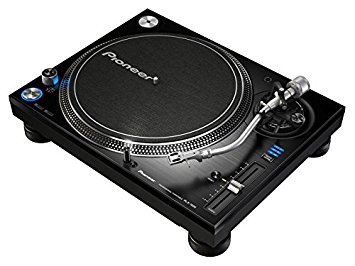
The PLX-1000 is precision engineered for the booth, drawing on 50 years’ experience of making high-end turntables. The result is a familiar layout with some next generation improvements, including a high-torque direct drive system, multi-pitch control, club-grade build and sound quality, and detachable power and audio cables. It’s solidly built for excellent vibration damping and ultra-precise, high-grade audio playback.
Simply add your choice of cartridge and stylus to the PLX-1000 (not included) and combine with your mixer for an ideal setup for turntablists. An ideal match for DJs is the handmade PC-X10 (sold separately).
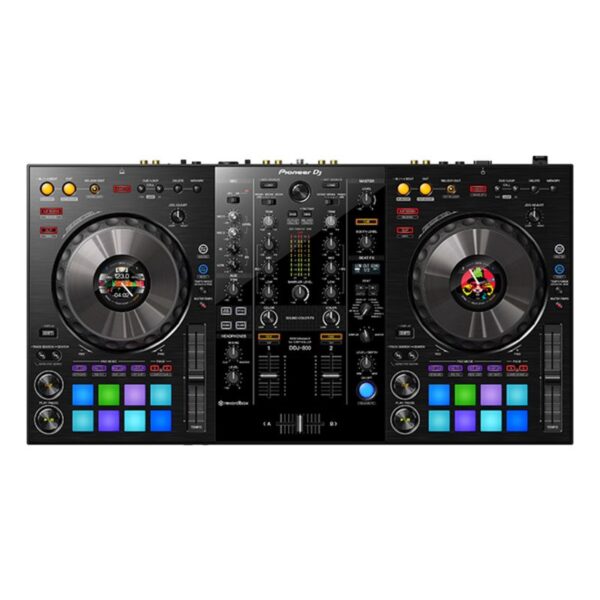
The DDJ-800 2-channel DJ controller is a pro DJ setup that’s made to go wherever you do. This portable unit inherits the club-style layout and popular features of the DDJ-1000, including Color On Jog Displays, and packs it all into a lighter body. The result is a professional performance controller that you’ll have no trouble transporting between gigs at weddings, parties and anywhere else you play.
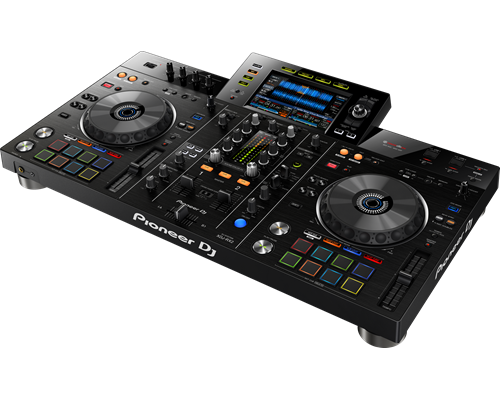
The XDJ-RX2 is an upgrade of the popular XDJ-RX, combined with features and traits from the flagship NXS2 series. The 2-deck, 2-channel all-in-one system delivers a professional DJ experience whether you connect it to rekordbox dj via your laptop or music stored on a USB device.The XDJ-RX2 boasts a large, 7-inch touch screen with QWERTY search, plus features inherited from the CDJ-2000NXS2 and DJM-9000NXS2, including rotary selector, track filter, short cuts, Sound Colour FX and Beat FX. The 8 large, multi-coloured Performance Pads give you smooth control over Hot Cues, Beat Loop, Slip Loop and Beat Jump. Take your performance to the next level as you enjoy the ease and portability offered by an all-in-one solution.
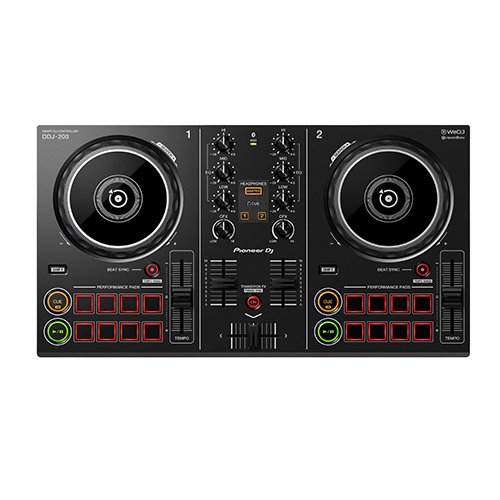
Start DJing with our easy-to-use DDJ-200 smart DJ controller. Lightweight and compact with a pro-style layout, it’ll help you learn to mix and, if you want to, develop DJing from a hobby into something more. Put your own twist on the music as you mix for friends at parties. Play tracks via your smartphone or PC/Mac using a variety of DJ apps and software including our dedicated, free app WeDJ for iPhone, as well as djay and edjing Mix. Depending on your device and the program you choose, you can mix music stored in your iTunes or rekordbox library, or stream songs from Beatport LINK, SoundCloud Go+, Deezer or even Spotify.
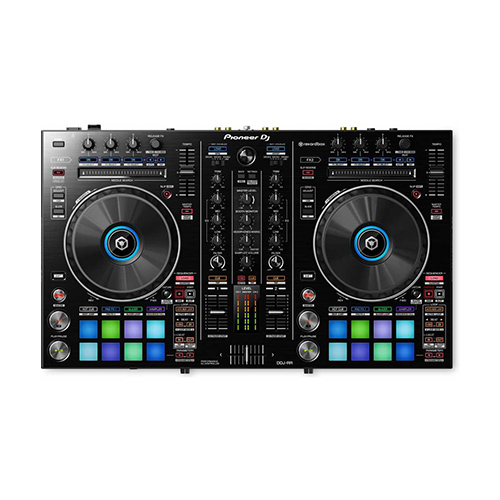
The DDJ-RR is the little brother of our professional controllers for rekordbox dj, the DDJ-RZ and DDJ-RX. It has a compact design and intuitive layout with large jog wheels, illuminated on-jog indicators and tactile Performance Pads.This 2-channel controller comes with dedicated controls for rekordbox dj, such as Slip Mode, Release FX, Sequence Load, and Deck Select so you can switch between all 4 rekordbox dj decks by the touch of a button.
Content
TURN IT UP TO 11
Raise your game with the DJM-S11. This new professional 2-channel, 4-deck control battle mixer enhances various elements from its predecessor, the DJM-S9, and offers a host of brand-new features to help you perform more freely with Serato DJ Pro or rekordbox.
KEY FEATURESCustomizable touch screen
A 4.3-inch customizable touch screen gives all the information you need. Browse tracks, check waveforms, and dynamically change the texture of the music with TOUCH FX. With Touch MIDI you can directly control functions in your DJ software without touching your laptop.
Waveform screen
Spend more time focusing on your mix thanks to the high-frame-rate color touch screen, which shows everything from waveforms to BPM so you can stay in the zone. You can even customize it with your preferred style of layout.
Browse screen
Rapidly select tracks by checking the information on the screen – there’s no need to look at your laptop – and instantly see their playback status.
DECK 3/4 Control screen
Want to pack more sounds into your sets? Play up to 4 tracks or samples simultaneously with Deck 3/4 Control, an innovative feature that adds two extra decks – accessible via the touch screen. These additional decks let you control EQs, Hot Cues, pitch bend, and more.
Deck Move
Access two extra Deck 3/4 features with Serato DJ Pro. With Deck Move, you can seamlessly move tracks from deck 1 to 4 and deck 2 to 3. Use it to free up your main decks when mixing and scratching. Use Dual Deck control to adjust volume and effects for two decks at once.
Touch FX screen
Express yourself in new ways. Switch to the Touch FX screen and you can control 2 effects at the same time by tracing a finger across the surface while the other hand is scratching with the crossfader or finger drumming on the Performance Pads.
FX Setting screen
In the FX Setting screen, you can save 4 banks of effect types and parameters, then instantly call them up in different scenarios, e.g. when you’re battling, mashing up tracks, or playing a club set.
Touch MIDI screen
Touch MIDI offers four pages of presets that enable you to control functions in your DJ software without touching your laptop. The controls can also be custom MIDI mapped, enabling you to set things up to suit your style.
Expanded effects section
Spice up your sets with 22 Beat FX, including the new Fader Pitch and Helix. Smooth Echo is a new effect that you can automatically engage when you move the faders or hit the pads you’ve assigned as triggers.
Improved Performance Pads
The 8 Performance Pads are bigger, making them easier to hit in energetic battles. In Serato DJ Pro, use Combo Pad mode to combine up to 4 different pad modes at once, and use Scratch Bank to call up assigned scratch samples by just tapping a pad.
Enhanced MAGVEL FADER PRO
We’ve enhanced the feeling of the MAGVEL FADER PRO and boosted its vertical rigidity by 30 percent. This means you can scratch with more confidence, while the tougher coating around the crossfader area reduces wear and tear.
Crystal-clear sound quality
The DJM-S11 inherits the raw and high-density sound from the DJM-900NXS2 thanks to studio-quality 64-bit mixing and dithering processing inside the DSP, and a low-jitter clock circuit and 32bit high-quality D/A converter in the master output section.
OTHER FEATURESUSB hub
Plug your DJ controllers and other devices – including selected units from other brands – into the dual USB-A ports to play with them.
MIDI controller
This device is fully MIDI assignable via USB. Send control information to external devices and use the mixer as a MIDI controller.
Serato DJ Pro
Connect your PC/Mac to use Serato DJ Pro. Use dedicated buttons for FX and advanced Serato features like Beat Jump, Slip mode, and Quantize.
Serato DVS
Use Serato DVS to control and scratch with CDJs or turntables.
Pitch 'n Time DJ
Serato Pitch ‘n Time DJ Expansion Pack is included. Use Pitch Play, Flip, Key Shift and more features. The mixer is fully MIDI mappable too.
rekordbox
Connect your PC/Mac to unlock rekordbox Performance mode for free and use DVS mode with the dedicated control vinyl (available separately).
Title
Value
Included Accessories
Audio cable
Turntable sheet
Slip mat and sheet
Dust cover
Head shell
Balance
sub and shell weights
Ground wire
Weight
14.6 kg
Drive Method
Quartz lock, servo-type, direct drive
Platter
Aluminium, die-casting diameter: 332 mm
Motor
3-phase, brushless DC motor
Braking System
Electronic brake
Rotation Adjustment Range
±8, ±16, ±50 %
Rotation Speed
33⅓-45 rpm
Wow and Flutter
< 0.01 % (Measured by obtaining signal from built-in frequency generator of motor assembly.)
Signal-to-Noise Ratio
70 dB
Starting Torque
> 4.5 kgf・cm
Start Time
Within 0.3 sec (at 33⅓ rpm)
Arm Type
Universal type S-shape tone arm Gimbal-supported type bearing structure Static balance type
Overhang
15 mm
Effective Length
230 mm
Tracking Error
Within 3°
Height Adjustment Range
6 mm
Proper Cartridge Weight
3.5-13 g
Stylus Pressure Variable Range
0-4 g (1 scale 0.1 g)
Brand
Pioneer
Height
159 mm
width
453 mm
USB
No
inputs
No
outputs
1 ANALOGUE (RCA)
Depth
353 mm
TAKE YOUR PERFORMANCE ANYWHERE
The DDJ-800 2-channel DJ controller is a pro DJ setup that’s made to go wherever you do. This portable unit inherits the club-style layout and popular features of the DDJ-1000, including Color On Jog Displays, and packs it all into a lighter body. The result is a professional performance controller that you’ll have no trouble transporting between gigs at weddings, parties and anywhere else you play.
Stop worrying about MCs walking in front of the speaker thanks to the compatible Feedback Reducer feature in rekordbox dj. The system will automatically bring down the ‘howling’ sound from the mic – extra handy when you have 2 microphones plugged in at once. Use the DDJ-800 to mix audio from external sources, and apply Sound Color FX, Beat FX, EQs and Trim to make all of your shows unique.
KEY FEATURES
COMPACT AND PORTABLE
Though it feels like our advanced DDJ-1000 DJ controller, the DDJ-800 is 1.3 kg lighter so you can comfortably transport it between events.
JOG DISPLAY
Keep your eyes on the deck and off your computer thanks to the customizable Color LCD On Jog Display located in the centre of each jog wheel. Reveal only the information you need, whether that’s BPM, waveform, playback position or Hot Cue and Loop points.
FEEDBACK REDUCER
Enjoy peace of mind when you hand the mic to guest speakers and MCs. The Feedback Reducer feature in rekordbox dj will instantly detect and reduce the ‘howling’ sound of microphone feedback so you’ll remain in complete control of the audio.
CLUB-STYLE LAYOUT
Performing on the DDJ-800 feels like you’re using a professional NXS2 set-up. The controller’s buttons, knobs and faders are arranged in the same way as those on our club-standard CDJ and DJM gear.
AUDIO MIXER FEATURE
Use the DDJ-800 as a mixer to control the volume of audio from an external device – even when you’re using it on its own – by adjusting the trims, channel faders and EQs. And, when connected to rekordbox dj, you can use Sound Color FX and Beat FX too.
INHERIT THE BOOTH
The XDJ-RX2 is an upgrade of the popular XDJ-RX, combined with features and traits from the flagship NXS2 series. The 2-deck, 2-channel all-in-one system delivers a professional DJ experience whether you connect it to rekordbox dj via your laptop or music stored on a USB device.The XDJ-RX2 boasts a large, 7-inch touch screen with QWERTY search, plus features inherited from the CDJ-2000NXS2 and DJM-9000NXS2, including rotary selector, track filter, short cuts, Sound Colour FX and Beat FX. The 8 large, multi-coloured Performance Pads give you smooth control over Hot Cues, Beat Loop, Slip Loop and Beat Jump. Take your performance to the next level as you enjoy the ease and portability offered by an all-in-one solution.
KEY FEATURES
LARGE TOUCH SCREEN
The 7-inch, full-colour touch screen gives you a quick visual reference during mixes, including Wave Zoom for detail on track peaks and breakdowns. Browse with the QWERTY keyboard, large rotary selector, Needle Search, Track Filter and Short Cut features.
PRO DJ FEATURES
Perform precise, smooth mixes with EQs and channel faders that feature curves equivalent to those on the DJM-900NXS2 professional club mixer. Also inherited are the Sound Colour FX and Beat FX giving you scope for creative flair.
MULTI-COLOURED PERFORMANCE PADS
Unleash your creativity with 8 large, multi-coloured tactile Performance Pads on each deck for instant access to professional performance features such as Hot Cues, Beat Loop, Slip Loop and Beat Jump (singular or continuous).
LINK EXPORT FOR REKORDBOX
With the USB connection (Link Export), you can connect your laptop directly to the XDJ-RX2 and import your tracks to rekordbox. Play your prepared tracks without needing to export them to a USB device.
REKORDBOX DJ
You get a rekordbox dj licence key bundled with the XDJ-RX2. Simply activate your licence key for our DJ software, connect the device and start DJing.
COMPATIBLE APPS
Connect your smartphone, tablet, or PC/Mac to start mixing. A number of software programs and apps – including WeDJ, djay, edjing Mix and rekordbox dj – are compatible with selected devices. You’ll also have free use of all the features in WeDJ for iPhone that normally require in-app payments.
COMPATIBLE STREAMING SITES
Depending on your app and device combo, you can mix sounds via streaming services including Beatport LINK, SoundCloud Go+, Deezer, and even Spotify.
TUTORIAL & POP-HINT
Our updated WeDJ for iPhone app includes Tutorial and Pop-Hint features. They’ll help you learn how to operate the controller, discover the basics of DJing including common DJ terms, and have you mixing in no time.
TRANSITION FX
Just starting out behind the decks? Transition between tracks and make it sound professional with the Transition FX feature in WeDJ for iPhone. Choose from 11 effect styles and simply slide the crossfader to the other side to smoothly switch tunes.
COMPACT LIGHTWEIGHT BODY
The DDJ-200 is lightweight and portable. Leave the speakers at home and play sound from your smartphone, tablet, or PC/Mac’s audio outputs. No outlet handy? No problem. Power the controller via an external battery.
Switch tracks naturally
Our Phrase Sync feature will analyze and align the positions of 2 tracks. As a result, it will sound natural when you switch between tunes.
Split output
While everybody else hears the master sound through the speakers, you’ll be listening to and cueing the next track on your headphones. Simply plug in split cables to separate the audio.
rekordbox dj
Simply connect the DDJ-200 to your PC/Mac to enable rekordbox dj. You don’t need to enter a license key to use the software with the controller.
The Pioneer DJ DDJ-RR feels slightly lighter than the DDJ-SR, though both have metal faceplates. It’s got a new black colour scheme that’s consistent with other DDJ-R series controllers. The rest of the enclosure is hard plastic, as is the case with most Pioneer DJ gear.
It ships with a power brick which increases the brightness of the lights, but you can power it with just a USB cable. You can also use it as a standalone mixer for connecting line / phono level devices to it like CDJs and turntables if you want to spin with actual CDs and vinyl.
There are two Needle Search touchstrips here and controls for Rekordbox DJ’s sequencer, which we’ll get to in a minute. The pads are also backlit RGB now, as is the case with more recent controllers.
JogwheelsThe most notable change in the DDJ-RR are the jogwheels: they’re slightly larger than the ones on the DDJ-SR, and have a spiffy (if muted) black colour. I’m digging the look, especially when you plug it in and the formerly red lights are now a mix of blue and yellow.
The centre ring has an LED that lights up in different colours depending on what you’ve got it set to, for example when you’re controlling deck one or two the ring’s blue, and when you’re controlling decks three or four it turns light blue.
I love the jogwheels on the DDJ-RR, I think these are close to perfect as far as controller jogs go, plus they integrate so tightly with Rekordbox DJ (version 4.12 at the time of this writing) that you won’t skip a beat. Kudos to Pioneer DJ for versioning Rekordbox DJ quickly too as a lot of the bugs that plagued earlier versions of the software have been squashed.
Needle Search
The DDJ-RR comes with a touchstrip for Needle Search, which lets you jump around a track directly from the controller itself: in the past you had to hold the Shift button and spin the jog to quickly move around a track, or you could bring your mouse pointer to the point that you want to jump to. It’s a minor tweak, but a welcome one especially for those who would prefer to keep their hands on the controller.
Rekordbox DJ
Just like the rest of Pioneer DJ’s DDJ-R series, the DDJ-RR works specifically with Rekordbox DJ. While mappings for Traktor and Virtual DJ 8 will probably crop up, the DDJ-RR is meant to work tightly with Rekordbox DJ, and the good news is that it works well with it. I’m particularly impressed with the Pad Effects that let you do momentary FX by using the performance pads in the Pad FX 1 setting. Rekordbox DJ has got much more stable since its first outing, and I’ve done a few gigs with it without issue.
There are also controls here for the Rekordbox DJ Sequencer, which let you record, save, and playback audio patterns that you perform via the Sampler. Once stored, you can trigger these Sampler patterns using the Sequence Call feature of the performance pads.
Rekordbox DVS
Another big addition that isn’t readily apparent here is Rekordbox DVS: both channels can be switched to control any of Rekordbox DJ’s four decks or two lines/phono sources, meaning you can hook up a pair of CDJs or turntables for timecode control.This is an important consideration for many who want to take the DVS route but found the DDJ-RX too big (let’s not even talk about the DDJ-RZ). With the DDJ-RR, you’ve got a considerably smaller, decently specified controller that you can spin timecode on at home. You can even take it to the gig and plug the venue’s CDJs / turntables if that’s what you want to do. Again, flexibility is a core strength of the DDJ-RR, and probably its biggest advantage in the market right now.
The mixer
The DDJ-RR can also function as a standalone two-channel mixer with hardware EQs and filters, useful for DJing with actual CDs and vinyl without the need for a computer.
The crossfader is loose and capable of quick cuts but it doesn’t feel as sturdy as the DDJ-SR, and this is probably my only gripe with this unit. The same goes for the channel faders – there’s just something that feels “cheap” about them, but they’re still quite good. Pioneer DJ has also removed the crossfader curve knob and reverse switch from the front of the unit, so if you want to make those adjustments you’ll have to go to the settings menu.




Reviews
There are no reviews yet.