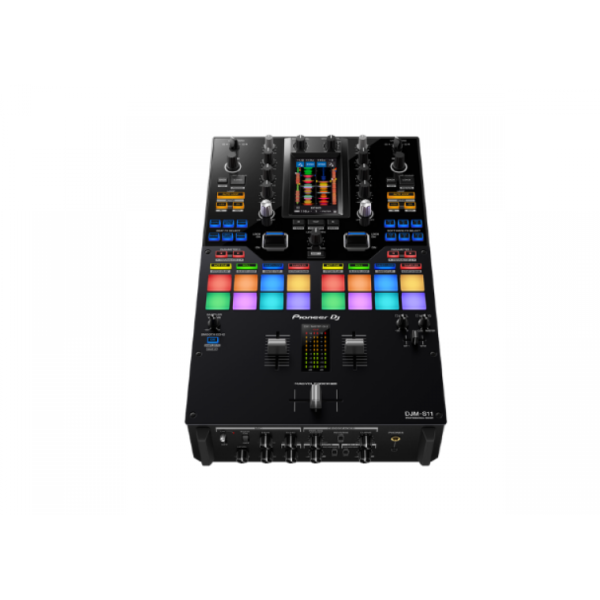
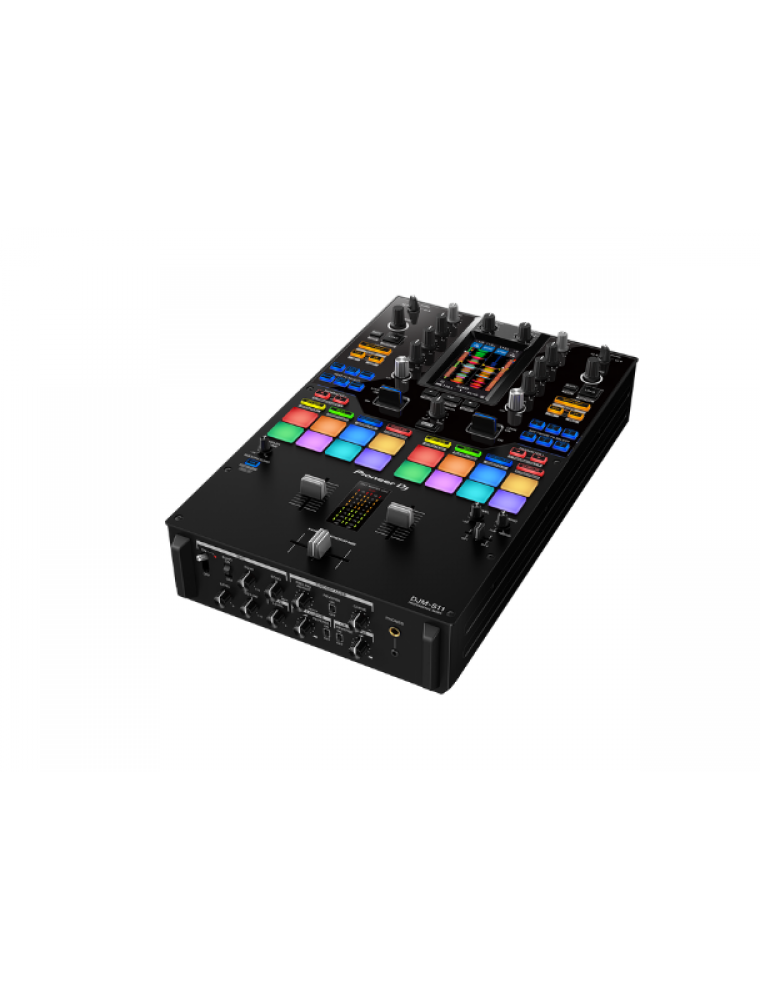
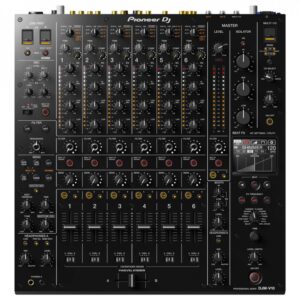
Pioneer DJ DJM-S11

AED 8,299.00
admin

Professional scratch style 2-channel DJ mixer (Black)

Out stock

Out of stock

Categories: ,


TURN IT UP TO 11

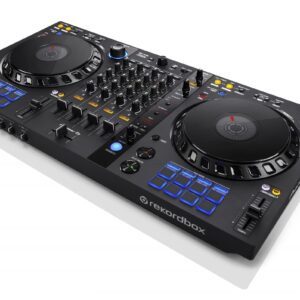
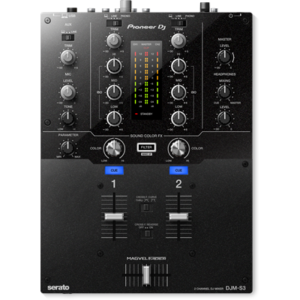
Raise your game with the DJM-S11. This new professional 2-channel, 4-deck control battle mixer enhances various elements from its predecessor, the DJM-S9, and offers a host of brand-new features to help you perform more freely with Serato DJ Pro or rekordbox.

KEY FEATURES

Customizable touch screen
A 4.3-inch customizable touch screen gives all the information you need. Browse tracks, check waveforms, and dynamically change the texture of the music with TOUCH FX. With Touch MIDI you can directly control functions in your DJ software without touching your laptop.

Waveform screen
Spend more time focusing on your mix thanks to the high-frame-rate color touch screen, which shows everything from waveforms to BPM so you can stay in the zone. You can even customize it with your preferred style of layout.

Browse screen
Rapidly select tracks by checking the information on the screen – there’s no need to look at your laptop – and instantly see their playback status.

DECK 3/4 Control screen
Want to pack more sounds into your sets? Play up to 4 tracks or samples simultaneously with Deck 3/4 Control, an innovative feature that adds two extra decks – accessible via the touch screen. These additional decks let you control EQs, Hot Cues, pitch bend, and more.

Deck Move
Access two extra Deck 3/4 features with Serato DJ Pro. With Deck Move, you can seamlessly move tracks from deck 1 to 4 and deck 2 to 3. Use it to free up your main decks when mixing and scratching. Use Dual Deck control to adjust volume and effects for two decks at once.

Touch FX screen
Express yourself in new ways. Switch to the Touch FX screen and you can control 2 effects at the same time by tracing a finger across the surface while the other hand is scratching with the crossfader or finger drumming on the Performance Pads.

FX Setting screen
In the FX Setting screen, you can save 4 banks of effect types and parameters, then instantly call them up in different scenarios, e.g. when you’re battling, mashing up tracks, or playing a club set.

Touch MIDI screen
Touch MIDI offers four pages of presets that enable you to control functions in your DJ software without touching your laptop. The controls can also be custom MIDI mapped, enabling you to set things up to suit your style.

Expanded effects section
Spice up your sets with 22 Beat FX, including the new Fader Pitch and Helix. Smooth Echo is a new effect that you can automatically engage when you move the faders or hit the pads you’ve assigned as triggers.

Improved Performance Pads
The 8 Performance Pads are bigger, making them easier to hit in energetic battles. In Serato DJ Pro, use Combo Pad mode to combine up to 4 different pad modes at once, and use Scratch Bank to call up assigned scratch samples by just tapping a pad.

Enhanced MAGVEL FADER PRO
We’ve enhanced the feeling of the MAGVEL FADER PRO and boosted its vertical rigidity by 30 percent. This means you can scratch with more confidence, while the tougher coating around the crossfader area reduces wear and tear.

Crystal-clear sound quality
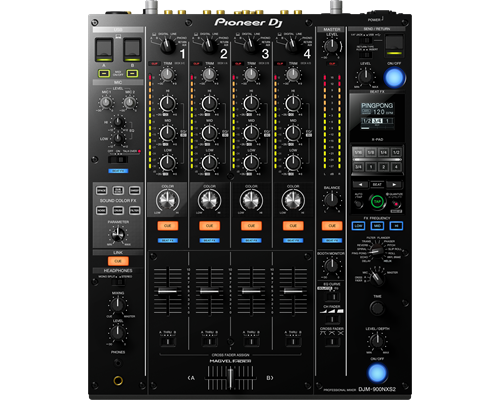
The DJM-S11 inherits the raw and high-density sound from the DJM-900NXS2 thanks to studio-quality 64-bit mixing and dithering processing inside the DSP, and a low-jitter clock circuit and 32bit high-quality D/A converter in the master output section.

OTHER FEATURES

USB hub
Plug your DJ controllers and other devices – including selected units from other brands – into the dual USB-A ports to play with them.

MIDI controller
This device is fully MIDI assignable via USB. Send control information to external devices and use the mixer as a MIDI controller.

Serato DJ Pro
Connect your PC/Mac to use Serato DJ Pro. Use dedicated buttons for FX and advanced Serato features like Beat Jump, Slip mode, and Quantize.

Serato DVS
Use Serato DVS to control and scratch with CDJs or turntables.

Pitch ‘n Time DJ
Serato Pitch ‘n Time DJ Expansion Pack is included. Use Pitch Play, Flip, Key Shift and more features. The mixer is fully MIDI mappable too.

rekordbox
Connect your PC/Mac to unlock rekordbox Performance mode for free and use DVS mode with the dedicated control vinyl (available separately).
Reviews

There are no reviews yet.

Be the first to review “Pioneer DJ DJM-S11”

Your email address will not be published. Required fields are marked *

Quick Comparison

SettingsPioneer DJ DJM-S11 removePioneer 4-Channel DJ controller For Rekordbox DDJ-1000, Black removeDJM 750MK 2 removeCDJ-900NEXUS removeCDJ-2000NEXUS-2 removePioneer DJ DDJ-400 2-channel DJ controller for rekordbox dj remove
Image
SKU
Rating
PriceAED 8,299.00AED 5,299.00AED 5,199.00AED 5,300.00AED 8,499.00AED 1,150.00
Stock

Out of stock

Out of stock

Out of stock

Out of stock

Out of stock

Out of stock

AvailabilityOut of stockOut of stockOut of stockOut of stockOut of stockOut of stock
Add to cart

DescriptionProfessional scratch style 2-channel DJ mixer (Black)Make the most of rekordbox dj’s enhanced new features with our dedicated 4-channel DJ controller. Featuring the professional layout inherited from the flagship NXS2 models, it’s the portable, compact solution for performing at parties and events. The DDJ-1000 features all-new high definition LCD screens on each jog wheel, allowing you to keep your eyes intuitively on the deck.Fluidly select tracks you didn’t consider compatible thanks to rekordbox dj’s new Related Tracks feature. Bring creative flair to performances with 14 Beat FX – including four new versions – and instantly trigger Hot Cues, Loops and more with the 16 multicoloured Performance Pads.Take the step to the DJ booth seamlessly with the DJM-750MK2, a 4-channel mixer which inherits key features and design elements from the DJM-900NXS2, creating a club-style setup when combined with our professional CDJ or XDJ multi players. You can perform seamless mixes on the DJM-750MK2 thanks to the smooth curves on the EQs and channel faders. The Magvel crossfader, inherited from the DJM-900NXS2, gives a precise response and assured feel during even the most complicated scratch techniques.
The CDJ-900NXS builds on the success of its predecessor, the CDJ-900, plus it’s packed with new technology including a full colour LCD screen, Beat Divide, four-deck Beat Sync and the ability to play sets from a smartphone. The CDJ-900NXS boasts a high resolution screen, giving DJs a quick and instant view of the Wave Display and Wave Zoom and the ability to view and edit rekordbox beatgrids.
The CDJ-2000NXS2 inherits all the best features from its predecessor – the CDJ-2000NXS – and takes a giant leap forward. We’ve added a larger, multicolour touch screen with a Qwerty keyboard and search filters to help you select tracks faster. 2 banks of 4 Hot Cues give you more creative freedom, while a 96 kHz/24-bit sound card and support for FLAC/Apple Lossless Audio (ALAC) means you can play with higher resolution formats.With the Pioneer DDJ-400, you'll learn the intricacies of the profession as a starting DJ. Thanks to the internal sound card, you don't need to connect an audio interface. This means that you can connect the DJ controller directly to your speakers. Thanks to the velocity-sensitive and multifunctional drum pads, you can get the most out of the included Rekordbox software. Use the drum pads to activate the sampler, and personalize your set by adding sound clips. You can also use the drum pads to easily jump to a hot cue.
Content   TURN IT UP TO 11 Raise your game with the DJM-S11. This new professional 2-channel, 4-deck control battle mixer enhances various elements from its predecessor, the DJM-S9, and offers a host of brand-new features to help you perform more freely with Serato DJ Pro or rekordbox. KEY FEATURES Customizable touch screen A 4.3-inch customizable touch screen gives all the information you need. Browse tracks, check waveforms, and dynamically change the texture of the music with TOUCH FX. With Touch MIDI you can directly control functions in your DJ software without touching your laptop. Waveform screen Spend more time focusing on your mix thanks to the high-frame-rate color touch screen, which shows everything from waveforms to BPM so you can stay in the zone. You can even customize it with your preferred style of layout. Browse screen Rapidly select tracks by checking the information on the screen – there’s no need to look at your laptop – and instantly see their playback status. DECK 3/4 Control screen Want to pack more sounds into your sets? Play up to 4 tracks or samples simultaneously with Deck 3/4 Control, an innovative feature that adds two extra decks – accessible via the touch screen. These additional decks let you control EQs, Hot Cues, pitch bend, and more. Deck Move Access two extra Deck 3/4 features with Serato DJ Pro. With Deck Move, you can seamlessly move tracks from deck 1 to 4 and deck 2 to 3. Use it to free up your main decks when mixing and scratching. Use Dual Deck control to adjust volume and effects for two decks at once. Touch FX screen Express yourself in new ways. Switch to the Touch FX screen and you can control 2 effects at the same time by tracing a finger across the surface while the other hand is scratching with the crossfader or finger drumming on the Performance Pads. FX Setting screen In the FX Setting screen, you can save 4 banks of effect types and parameters, then instantly call them up in different scenarios, e.g. when you’re battling, mashing up tracks, or playing a club set. Touch MIDI screen Touch MIDI offers four pages of presets that enable you to control functions in your DJ software without touching your laptop. The controls can also be custom MIDI mapped, enabling you to set things up to suit your style. Expanded effects section Spice up your sets with 22 Beat FX, including the new Fader Pitch and Helix. Smooth Echo is a new effect that you can automatically engage when you move the faders or hit the pads you’ve assigned as triggers. Improved Performance Pads The 8 Performance Pads are bigger, making them easier to hit in energetic battles. In Serato DJ Pro, use Combo Pad mode to combine up to 4 different pad modes at once, and use Scratch Bank to call up assigned scratch samples by just tapping a pad. Enhanced MAGVEL FADER PRO We’ve enhanced the feeling of the MAGVEL FADER PRO and boosted its vertical rigidity by 30 percent. This means you can scratch with more confidence, while the tougher coating around the crossfader area reduces wear and tear. Crystal-clear sound quality The DJM-S11 inherits the raw and high-density sound from the DJM-900NXS2 thanks to studio-quality 64-bit mixing and dithering processing inside the DSP, and a low-jitter clock circuit and 32bit high-quality D/A converter in the master output section. OTHER FEATURES USB hub Plug your DJ controllers and other devices – including selected units from other brands – into the dual USB-A ports to play with them. MIDI controller This device is fully MIDI assignable via USB. Send control information to external devices and use the mixer as a MIDI controller. Serato DJ Pro Connect your PC/Mac to use Serato DJ Pro. Use dedicated buttons for FX and advanced Serato features like Beat Jump, Slip mode, and Quantize. Serato DVS Use Serato DVS to control and scratch with CDJs or turntables. Pitch 'n Time DJ Serato Pitch ‘n Time DJ Expansion Pack is included. Use Pitch Play, Flip, Key Shift and more features. The mixer is fully MIDI mappable too. rekordbox Connect your PC/Mac to unlock rekordbox Performance mode for free and use DVS mode with the dedicated control vinyl (available separately).
The Pioneer DJ DDJ-1000 controller is designed from the ground up to give you comprehensive control over rekordbox DJ software. It has everything you need to perform at events and parties, including two full-size jog wheels with On Jog Display, 14 Beat FX, and 16 multicolored performance pads. Using rekordbox DJ software's Related Tracks feature, you'll quickly be able to find tracks that flow well with the tune you're currently playing. Compact and portable, the Pioneer DJ DDJ-1000 controller combined with rekordbox DJ software is a sweet setup for mobile DJs.
BrandPioneerMIDIControlN/ADVS ControlNoIncluded DJ Softwarerekordbox dj , rekordbox dvsIncluded AccessoriesNoSoftware System RequirementsNoProDJ LinkP-LOCK Fader Caprekordbox LinkPlug and PlayAuto StandbyHeight107.9 mmwidth320 mmDepth387.9 mmWeight6.6 kgDimensions (with fold-out display)NoRack MountFrequency Range20 - 20000 HzSampling Rate48 kHzA/D, D/A ConverterN/AD/A Converter32 bitA/D Converter32 bitS/N Ratio PhonoN/AS/N Ratio Line105 dBS/N Ratio MicN/AS/N Ratio USBNoCrosstalk LineNoDistortion< 0.005 % (LINE)HeadroomNoPower ConsumptionN/APower SupplyN/AMaster BalanceStereo/Mono SwitchMaster Out AttenuatorEQ/ISO3 bandEQ/ISO RangeBuilt-in, switchable 3-band equaliser: -26 dB ~ +6 dB / 3-band isolator: -∞ ~ +6 dBLevel Meter TypeNoLevel Meter SizeNoReverse ChannelsPeak LimiterChannels4Sound Color FX
  • Dub Echo
  •  Filter
  •  Noise
  •  Sweep
Beat FX
  • Delay
  •  Echo
  •  Helix
  •  Ping Pong
  •  Pitch
  •  Spiral
  •  Reverb
  •  Roll
  •  Trans
  •  Vinyl Brake
  •  Flanger
Serato DJ FX powered by iZotope3-Band IsolatorAuto BPM CounterBeat SamplerDirect Beat SelectEffect Level & Depth VolumeEffect MixInloop SamplerLive SamplerMIDI Global ClockRoll Sampler (Fwd)Roll Sampler (Reverse)Sidechain Remix EffectsSound ProcessorNoTouch PanelFX FrequencyX-PADrekordbox QuantizePerformance ModesNoCrossfader TypeMagvel FaderCURVE AssignableField ReplaceableReverse CrossfaderTension AdjustmentFader Curve3Mic ConnectionNoMic EQN/AMic EQ RangeN/ATalkoverN/ATalkover AttenuatorAssignable ControlsNoMIDI Out (DIN)N/AMIDI On/OffMIDI Start/StopMIDI ClockConnectionN/AStereo InputsN/AStereo OutputsN/ASample RateN/Ainputs
  • 4 PHONO (RCA)
  •  1 MIC (1/4 inch TS Jack)
  •  4 LINE/LINE (RCA)
Send/Return
  • 1 SEND (1/4-inch TS jack)
  •  1 RETURN (1/4-inch TS jack)
LANN/AUSB
  • 1 USB A port
  •  1 USB B port
outputs
  • 2 MASTER (XLR
  •  RCA)
  •  1 BOOTH (1/4 inch TRS Jack)
  •  2 HEADPHONE MONITOR (1/4 inch Stereo Phone Jack
  •  3.5mm Stereo mini-jack)
Brand Pioneer
USB Storage Support No
MIDI Control
ProDJ Link
KUVO ready
Auto Standby
rekordbox
Included Accessories
  • Power cord
  •  CD-ROM (rekordbox
  •  driver software and operating instructions)
  •  Audio cable
  •  LAN cable
  •  Disc forced Eject Pin
  •  Read Before Use / Quick Start Guide
Height 105.5 mm
width 320 mm
Depth 401.8 mm
Dimensions (with fold-out display) When upper display part is upright at 90 degrees (W x D x H): 385 x 457.2 x 418 mm
Processor Wolfson DAC processor
Soundcard 24 bit/48 kHz
Frequency Range 4 - 20000 Hz
Signal-to-Noise Ratio 115 dB (JEITA)
Audio Output Level 2.0 Vrms (1 kHz, 0 dB)
Power Consumption 33 W
Display Full-colour LCD screen
Playing Address
Wave Zoom Display
Beat Counter
Distortion < 0.003 % (JEITA)
Jog Dial size 206 mm
Jog Dial type Touch sensitive
Jog Modes CDJ / Vinyl Mode
Active Loop
Auto Beat Loop
4 Beat Loop
Reloop
Real Time Seamless Loop
Loop Adjust In / Out Adjust
Loop Cutter
Slip Mode
Beat Sync
Reverse
Pitch Bend
Fader Start / Back Cue start
Scratch Play / Cue
Quick Scratch After searching track
Relay Play
Frame Search 1/150 s
My Settings
Vinyl Speed Adjust
Auto Cue
Manual Cue
Real Time Cue
Cue point sampler
Cue Loop Memory
Master Tempo
Tempo Control steps
  • 0.02 % at +/-6 %
  •  0.05 % at +/- 10 % & 16 %
  •  0.5 % at +/-100 % WIDE
Needle Search / Needle Drop
BPM Counter
Audio Sources
  • iPhone/iPad/iPod touch
  •  Android phones/Android Tablets
  •  USB storage devices (flash memory/HDD
  •  etc.)
  •  Computers (Mac/Windows PC)
  •  Optical drive (CD
  •  CD-R/RW
  •  DVD±R/RW/R-DL)
LAN 1 (100Base-TX)
USB No
outputs
  • 1 ANALOGUE (RCA)
  •  1 CONTROL (Mini-jack)
  •  1 S/PDIF Digital (RCA)
Brand Pioneer
USB Storage Support
  • FAT
  •  FAT32
  •  HFS+
MIDI Control
ProDJ Link
KUVO ready
Auto Standby
rekordbox
Included Accessories No
Height No
width No
Depth No
Dimensions (with fold-out display)
  • When upper display part is closed (W x D x H): 385 x 451 x 178 mm
  •  When upper display part is upright at 90 degrees (W x D x H): 385 x 457.2 x 418 mm
  •  When upper display part is fully open (W x D x H): 385 x 693.9 x 203.1 mm
Processor ESS Technologies DAC (ES9018)
Soundcard 24 bit/96 kHz
Frequency Range 4 - 40000 Hz
Signal-to-Noise Ratio 115 dB
Audio Output Level 2.0 Vrms (1 kHz, 0 dB)
Power Consumption 51 W
Display 7-inch built-in & 13-inch fold-out full-colour LCD touch screen
Playing Address
Wave Zoom Display
Beat Counter
Distortion < 0.0018 %
Jog Dial size 206 mm
Jog Dial type No
Jog Modes No
Active Loop
Auto Beat Loop
4 Beat Loop
Reloop
Real Time Seamless Loop
Loop Adjust No
Loop Cutter
Slip Mode
Beat Sync
Reverse
Pitch Bend
Fader Start / Back Cue start
Scratch Play / Cue
Quick Scratch No
Relay Play
Frame Search No
My Settings
Vinyl Speed Adjust
Auto Cue
Manual Cue
Real Time Cue
Cue point sampler
Cue Loop Memory
Master Tempo
Tempo Control steps No
Needle Search / Needle Drop
BPM Counter
Audio Sources
  • iPhone/iPad/iPod touch
  •  Android phones/Android Tablets
  •  USB storage devices (flash memory/HDD
  •  etc.)
  •  Computers (Mac/Windows PC)
  •  Optical drive (CD
  •  CD-R/RW
  •  DVD±R/RW/R-DL)
LAN 1 (100Base-TX)
USB No
outputs No

Pioneer DDJ 400

KEY FEATURES Of Pioneer DDJ 400

  • TUTORIALS of Pioneer DDJ 400
You'll have access to rekordbox dj's Tutorial feature. Follow along via your computer screen to learn how to use the gear and master DJ techniques on Pioneer DDJ 400.
  • CLUB-STYLE LAYOUT
The DDJ-400's buttons and knobs are arranged in the same way as those on our professional NXS2 set-up. Develop your skills using an interface similar to that of our club-standard player, and enhance your mixes with Sound Color FX and Beat FX featuring curves taken from our DJM-900NXS2 mixer. You'll soon feel comfortable performing in DJ booths.
  • BEAT FX
Apply professional FX that match the tempo of the track that’s currently playing by using the Beat FX feature. This will help you craft unique sets even if you’re just starting out.
  • REKORDBOX DJ
You get a rekordbox dj licence key bundled with this controller. Simply activate your licence key for our DJ software, connect the controller and start DJing.
  • PC MASTER OUT
For flexibility you can choose to hear your mix through your computer’s internal speakers or connected desktop speakers. At the same time, you can use your headphones to cue independently of the master out.
  • PLUG AND PLAY
With a built-in sound card, simply connect the controller to your computer using the provided USB cable to power up and begin playing. Offer Note: Free Hercules Club LED Wristband
Weight
DimensionsN/AN/AN/AN/AN/AN/A
Additional information